
Image Preview
1 / 1
HomeLearnPolymorphic Lookups in Dataverse: Complete Guide to Multi-Table Lookup Columns in Power Automate
🔥 AdvancedDataversePower Automate11 min readJune 2025

Polymorphic Lookups in Dataverse: Complete Guide to Multi-Table Lookup Columns in Power Automate

Learn how to work with polymorphic lookups in Dataverse using Power Automate. Polymorphic lookups can reference multiple table types, requiring special handling to determine which table the lookup points to and construct the correct entity reference. This guide covers the Customer and Regarding lookup types, checking lookup tables, and setting polymorphic lookup values.

RL
Rob Lees
Founder & Principal Consultant
Share

Overview

Polymorphic lookups in Dataverse allow a single lookup field to reference different table types. The Customer lookup can point to either an Account or Contact, and the Regarding lookup can reference any activity-enabled table. In Power Automate, working with polymorphic lookups requires checking which table type is referenced, retrieving the correct entity set name, and formatting lookup values with table-specific syntax.

Prerequisites

  • Power Automate cloud flow experience
  • Understanding of Dataverse lookup columns
  • Familiarity with entity set names and entity references
  • Experience with expressions and dynamic content

Understanding Multi-Table Lookup References

Polymorphic Lookups in Dataverse allows a single field to reference multiple types of entities. Instead of separate relationships for each entity, it enables dynamic linking across different tables by its property called 'Is Activity' allowing activity tables to be linked together.

For example, the Customer field in an Opportunity record can point to either an Account or a Contact, providing flexibility in data organisation. Similarly, the Regarding field in activities can reference multiple record types such as Leads or Cases.
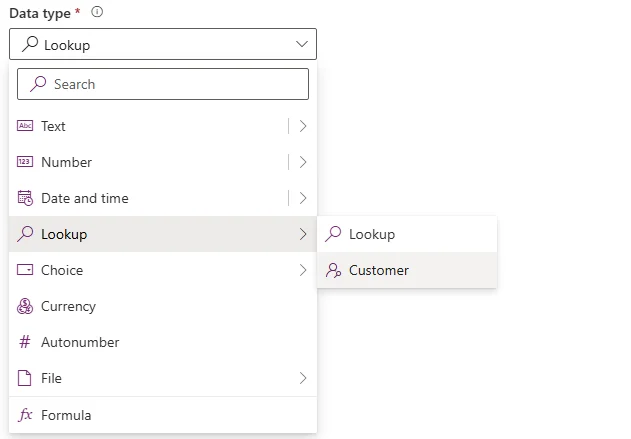
Customer lookup configured to reference both Account and Contact tables

Common polymorphic lookup types:

Lookup Field Can Reference Common Use Case
Customer Account, Contact Opportunities, Orders, Invoices - customer can be company or individual
Regarding Any activity-enabled table Emails, Phone Calls, Tasks - what record is this activity about
Owner User, Team Record ownership - can be owned by individual or team

Polymorphic lookups introduce extra handling in Power Automate, and support isolated applications, making them a powerful tool in Dataverse.

Why polymorphic lookups are challenging:

  • You must know which table type the lookup references before building entity reference
  • Different entity set names required for different table types (accounts vs contacts)
  • The lookup stores both the GUID and the table type indicator
  • Dynamic content doesn't automatically show which table is referenced
💡 Key Concept

Polymorphic lookups store two pieces of information: the GUID of the referenced record AND the entity logical name indicating which table type it points to. When retrieving polymorphic lookup data, you get properties like _customerid_value (GUID) and customeridtype (entity name). Both are needed to correctly reference or update the lookup in Power Automate.

Retrieving Polymorphic Lookup Data

Let's say we are using the Get A Response table 'value' and we want to know who has been created for, or this example this guy it Content or a Lead. Users would be to retrieve contacts only from the list. Each record could be linked to either a Content or a Lead, users would be to retrieve contacts has for any list. Each record could be linked to either a Content or a Lead, users would be to retrieve contacts has for any different look up columns tracks to create a Polymorphic Lookup field don't need to create a lookup field for the dataverse table instead we can use Add Existing column and create this for us.

Note: I need this in a solution that is a choice or a Polymorphic Lookup 'Linkage' flow.

To the Polymorphic Lookups Lookup first we have link choices, new we have where the Account. Over the table value. This will be the original name for the table, so with my case the link policies should still create the US on.

Polymorphic lookup output properties:

// Customer lookup outputs
{
  "_customerid_value": "a7b3c5e2-1234-5678-90ab-cdef12345678",
  "customeridtype": "account",
  "_customerid_value@OData.Community.Display.V1.FormattedValue": "Contoso Ltd",
  "_customerid_value@Microsoft.Dynamics.CRM.lookuplogicalname": "account"
}

Key properties explained:

Property Purpose Example Value
_customerid_value GUID of referenced record a7b3c5e2-1234-5678-90ab-cdef12345678
customeridtype Entity logical name (deprecated property) account or contact
@Microsoft.Dynamics.CRM.lookuplogicalname Entity logical name (correct property) account or contact
@OData.Community.Display.V1.FormattedValue Display name of referenced record Contoso Ltd

Accessing the table type in expressions:

// Get which table type the Customer lookup references
outputs('Get_opportunity')?['body/_customerid_value@Microsoft.Dynamics.CRM.lookuplogicalname']

// Returns: "account" or "contact"

For the attribute we may need to select a property. If we click on below the lookup then you can see the lookup been created, which we use that "choose your polymorphic feedback"

⚠️ Deprecated Property

The "customeridtype" property is deprecated and may be removed in future Dataverse versions. Always use the @Microsoft.Dynamics.CRM.lookuplogicalname annotation instead for determining which table type a polymorphic lookup references. This ensures your flows remain compatible with future platform updates.

Determining the Referenced Table Type

Here the Lookup 'Display Value' to get the Table which is been which call records to the Regarding table

Note the choice column in the Key details which first need referenced to for the Polymorphic Lookup

Table displaying polymorphic lookup values with entity type indicators

Using Condition to check table type:

Action: Condition

Condition: 
  outputs('Get_opportunity')?['body/_customerid_value@Microsoft.Dynamics.CRM.lookuplogicalname']
  equals
  account

If yes:
  // Customer is an Account
  // Use accounts entity set name
  
If no:
  // Customer is a Contact (or check for contact explicitly)
  // Use contacts entity set name

Using Switch for multiple possible table types:

Action: Switch

On: outputs('Get_email')?['body/_regardingobjectid_value@Microsoft.Dynamics.CRM.lookuplogicalname']

Case: incident
  // Regarding is a Case
  // Use incidents entity set name
  
Case: lead
  // Regarding is a Lead
  // Use leads entity set name
  
Case: opportunity
  // Regarding is an Opportunity
  // use opportunities entity set name
  
Default:
  // Handle unexpected table type

Example: Getting different entity set names based on type:

// For Customer lookup (Account or Contact)
if(
  equals(
    outputs('Get_record')?['body/_customerid_value@Microsoft.Dynamics.CRM.lookuplogicalname'],
    'account'
  ),
  'accounts',
  'contacts'
)

Here we get a record and we use that a new field has been created

This expression returns the appropriate entity set name based on which table type the Customer lookup references.

💡 Pro Tip

Store the lookuplogicalname value in a variable immediately after retrieving a record with a polymorphic lookup. This avoids repeating the long @Microsoft.Dynamics.CRM.lookuplogicalname expression throughout your flow. Set varEntityType to the logical name, then use the variable in conditions and entity reference construction for cleaner, more maintainable flows.

Creating Entity References for Polymorphic Lookups

In Dynamics now we can see that a new A new field has been created

Polymorphic lookup field showing table type selection dropdown

Now we can the form when we click each you can now see Computers and 'Lead'

Setting Customer lookup to an Account:

Action: Update a row
Table: Opportunities
Row ID: (opportunity GUID)

Customer:
if(
  equals(variables('varCustomerType'), 'account'),
  concat('/accounts(', variables('varCustomerGUID'), ')'),
  concat('/contacts(', variables('varCustomerGUID'), ')')
)

Note on the form when we click each you can now see two different types of records we can Now here

Complete example with type checking:

// Step 1: Determine customer type and GUID
// (from trigger, previous action, or user input)

// Step 2: Set variable for entity set name
Compose: Entity Set Name
if(
  equals(variables('varCustomerType'), 'account'),
  'accounts',
  'contacts'
)

// Step 3: Update record with polymorphic lookup
Update a row:
  Table: Orders
  Row ID: (order GUID)
  Customer: concat('/', outputs('Compose_Entity_Set_Name'), '(', variables('varCustomerGUID'), ')')

Setting Regarding lookup (multiple table possibilities):

// Regarding can reference many table types
Compose: Entity Set Name
switch(
  variables('varRegardingType'),
  'lead', 'leads',
  'opportunity', 'opportunities',
  'incident', 'incidents',
  'account', 'accounts',
  'contact', 'contacts',
  null
)

Update a row:
  Table: Emails
  Row ID: (email GUID)
  Regarding: 
    if(
      empty(outputs('Compose_Entity_Set_Name')),
      null,
      concat('/', outputs('Compose_Entity_Set_Name'), '(', variables('varRegardingGUID'), ')')
    )

We can see that records are just straight with using the Lookup. If we click "show" on the lookup then it will ask which using the Lookup.

Using nested if() for two-table polymorphic lookup:

// Customer lookup (Account or Contact only)
if(
  empty(variables('varCustomerGUID')),
  null,
  if(
    equals(variables('varCustomerType'), 'account'),
    concat('/accounts(', variables('varCustomerGUID'), ')'),
    concat('/contacts(', variables('varCustomerGUID'), ')')
  )
)

This handles both null values (clearing the lookup) and determining which entity set name to use based on customer type.

⚠️ Entity Logical Name vs Entity Set Name

The @Microsoft.Dynamics.CRM.lookuplogicalname property returns the entity LOGICAL name (singular: account, contact, lead), but entity references require the entity SET name (plural: accounts, contacts, leads). You must convert logical names to set names—don't assume adding 's' works (systemuser → systemusers, incident → incidents). Check each table's set name in Dataverse.

Real-World Scenarios and Solutions

Scenario 1: Creating activity with dynamic Regarding

// User selects record type and record from Power App
PowerApps trigger inputs:
  - RecordType (text): "lead", "opportunity", "case"
  - RecordGUID (text): GUID of selected record

// Map logical name to entity set name
Compose: Entity Set Name
switch(
  triggerBody()?['text'],
  'lead', 'leads',
  'opportunity', 'opportunities', 
  'incident', 'incidents',
  null
)

// Create email with Regarding set
Add a new row:
  Table: Emails
  Subject: "Follow up email"
  Regarding: concat('/', outputs('Compose_Entity_Set_Name'), '(', triggerBody()?['text_1'], ')')
  Owner: concat('/systemusers(', triggerBody()?['text_2'], ')')

Scenario 2: Copying Customer from one record to another

// Get source record (Opportunity)
Get a row:
  Table: Opportunities
  Row ID: (source opportunity GUID)

// Extract customer details
Compose: Customer Type
outputs('Get_opportunity')?['body/_customerid_value@Microsoft.Dynamics.CRM.lookuplogicalname']

Compose: Customer GUID
outputs('Get_opportunity')?['body/_customerid_value']

// Set customer on target record (Order)
Update a row:
  Table: Orders
  Row ID: (target order GUID)
  Customer:
    if(
      equals(outputs('Compose_Customer_Type'), 'account'),
      concat('/accounts(', outputs('Compose_Customer_GUID'), ')'),
      concat('/contacts(', outputs('Compose_Customer_GUID'), ')')
    )

Scenario 3: Filtering records by polymorphic lookup table type

// List all opportunities where Customer is a Contact (not Account)
List rows:
  Table: Opportunities
  Filter rows:
    Microsoft.Dynamics.CRM.In(PropertyName='customeridtype',PropertyValues=['contact'])

Scenario 4: Expanding polymorphic lookup to get related data

// Get opportunity with Customer details expanded
Get a row:
  Table: Opportunities
  Row ID: (opportunity GUID)
  Expand Query: customerid_account($select=name,accountnumber),customerid_contact($select=fullname,emailaddress1)

// Access expanded data based on type
if(
  equals(outputs('Get_opportunity')?['body/_customerid_value@Microsoft.Dynamics.CRM.lookuplogicalname'], 'account'),
  outputs('Get_opportunity')?['body/customerid_account/name'],
  outputs('Get_opportunity')?['body/customerid_contact/fullname']
)

Note that for expand queries with polymorphic lookups, you must specify separate navigation properties for each possible table type (customerid_account, customerid_contact).

💡 Pro Tip

Create a child flow specifically for handling polymorphic lookup formatting. Pass in the logical name and GUID, the child flow returns the properly formatted entity reference. This reusable pattern eliminates duplicating the if/switch logic across multiple flows and makes polymorphic lookup handling consistent across your solution.

Understanding Constraints and Workarounds

While polymorphic lookups provide flexibility in linking records across multiple tables, they come with some limitations. Discerning right tools can help complete, so filtering by simply type facilitates good decision-making.

Key limitations:

  • Cannot create rollup fields – Rollup calculations don't work with polymorphic lookups because the system can't determine which table to aggregate from
  • Limited relationship behaviors – Cascade delete and other relationship behaviors have restrictions with polymorphic lookups
  • Chart and view complexity – Creating charts or views filtering by polymorphic lookup requires extra configuration
  • No direct relationship query – You cannot query "all records related via this polymorphic lookup" without knowing the table type
  • Performance considerations – Querying across multiple table types through polymorphic lookups can be slower than standard lookups

Reporting challenges:

Reporting can be tricky as there though is designed polymorphic lookups remain a powerful tool for dynamic data relationships, especially in CRM and activity scenarios.

Despite these limitations, polymorphic lookups are essential for activity-based scenarios and situations requiring flexible relationships. Understanding their constraints helps you design better data models and flows.

When to use polymorphic lookups:

  • Activity tables (emails, phone calls, tasks) that can relate to any record type
  • Customer fields where both companies (Accounts) and individuals (Contacts) are valid
  • Owner fields that can be Users or Teams
  • Any scenario where a single field legitimately needs to reference multiple table types

When NOT to use polymorphic lookups:

  • If you always know which table type you're referencing — use a standard lookup instead
  • If you need rollup calculations or complex aggregations
  • If cascade behaviors are critical to your data model
  • If reporting and analytics are primary use cases

Additionally, Dataverse only supports polymorphic lookups for specific scenarios (Customer, Regarding, Owner). You cannot create custom polymorphic lookup fields for arbitrary table combinations—requiring advanced configurations.

⚠️ Custom Polymorphic Lookups

You cannot create custom polymorphic lookup columns through the Dataverse maker portal. Only system-provided polymorphic lookups (Customer, Regarding, Owner) are available. If you need custom polymorphic behavior, consider using multiple standard lookup columns with business logic to enforce that only one is populated, or explore multi-table lookup solutions with Power Apps component framework.

Next Steps

You now understand how to work with polymorphic lookups in Dataverse using Power Automate, including determining which table type is referenced, constructing correct entity references, and handling the unique challenges of multi-table lookup columns.

Expand your Dataverse polymorphic lookup capabilities by exploring:

  • Activity party lists – Working with To, From, CC fields in email activities which reference multiple records
  • Owner lookup patterns – Special handling for User vs Team ownership scenarios
  • Custom activities – Creating custom activity tables with Regarding lookups
  • Expand query optimization – Efficiently retrieving related data from polymorphic lookup referenced records
  • Error handling strategies – Gracefully managing unexpected table types in polymorphic lookups
  • Reporting workarounds – Techniques for analytics and dashboards with polymorphic lookup data
  • Migration patterns – Moving data between environments while preserving polymorphic lookup references

The Microsoft Dataverse Web API lookup properties documentation provides comprehensive technical details on polymorphic lookup structures, OData annotations, and advanced query patterns for building sophisticated Dataverse integration solutions.

Article Info
Advanced
For experienced Power Platform developers.
11 min read  ·  June 2025
Prerequisites
Power Automate cloud flow experience
Understanding of Dataverse lookup columns
Familiarity with entity set names and entity references
Experience with expressions and dynamic content

Need this built for your business?

We design and build production-grade Power Platform solutions for FM, Construction and Manufacturing businesses.

Book a Discovery Call →