Image Preview
1 / 1
HomeLearnDataverse Parent-Child Relationships: Configure Cascade Behaviour and Deletion Rules
✦ BeginnerDataverse13 min readMarch 2026

Dataverse Parent-Child Relationships: Configure Cascade Behaviour and Deletion Rules

Learn how to configure parent-child relationships in Dataverse with proper cascade behaviour for record deletion, assignment, sharing, and merging. This guide covers understanding relationship types, configuring parental versus referential behaviour, implementing restrict delete to prevent orphaned records, customising cascade rules for business requirements, and managing relationship dependencies across complex data models.

RL
Rob Lees
Founder & Principal Consultant
Share

Overview

Parent-child relationships in Dataverse define how operations on parent records affect related child records through cascade behaviour settings. By configuring cascade rules for delete, assign, share, merge, and reparent operations, you control whether actions propagate to children, are restricted, or leave children orphaned. Understanding these behaviours is essential for maintaining data integrity and preventing unintended record deletions in production environments.

Prerequisites

  • Advanced Dataverse table design experience
  • Understanding of relationship types and lookup fields
  • Familiarity with data modelling concepts
  • Experience with model-driven app configuration

Why Parent-Child Relationships Matter

Parent-child relationships (also referred to as Microsoft Dataverse as a whole) are a building block for structuring data, especially when dealing with complex use cases where one entity relates to many child records and these child records should inherit actions from a parent. Understanding when and how to apply parental vs referential behavior is critical to building resilient and sustainable data architecture.

Common parent-child scenarios:

  • Projects with related Tasks (deleting project deletes all tasks)
  • Accounts with Contacts (deleting account can orphan or delete contacts)
  • Orders with Order Lines (order deletion must cascade to line items)
  • Cases with Activities (case closure affects related activities)
  • Custom entities with child records requiring inheritance

Why cascade behaviour matters:

  • Data integrity – Prevent orphaned records without parent references
  • User experience – Clear understanding of deletion consequences
  • Business logic – Enforce rules like "cannot delete customer with active orders"
  • Performance – Cascade operations handle bulk deletions efficiently
  • Compliance – Meet data retention and deletion requirements

Operations affected by cascade behaviour:

  • Delete – What happens to child records when parent is deleted
  • Assign – Whether child records follow parent ownership changes
  • Share – If sharing parent also shares children
  • Unshare – Removing parent access affects child access
  • Merge – Combining duplicate parent records and their children
  • Reparent – Changing lookup value propagates to children
💡 Key Concept

Cascade behaviour determines how actions on parent records propagate to child records. Parental behaviour means children inherit actions (delete parent = delete children). Referential behaviour means children remain independent (delete parent leaves children intact). Restrict behaviour prevents parent actions if children exist. Choosing the correct behaviour for each operation is essential for data integrity and business rule enforcement.

Relationship Behaviour Types

The three primary behaviour types:

  • Parental – Child records inherit actions from parent (tight coupling)
  • Referential – Child records remain independent (loose coupling)
  • Referential, Restrict Delete – Prevent parent deletion if children exist
  • Custom – Configure each cascade action individually

Parent-child relationships (also referred to as 1 N relationships) work by having the child table have a lookup to the parent table, and the actions that the parent undergoes are then cascaded down to the child or not. There are four relationship behaviours to choose from (with one being deprecated so really three):

  • Parental (provides Cascade All behavior automatically). The way this works relates to you configuring
  • Referential (custom configuration where you can select various actions, more flexible)
  • Referential, Restrict Delete (default, prevents parent deletion if children exist)
  • Custom (deprecated but still visible in older relationships)

How each behavior works:

Behaviour Type Delete Parent Assign Parent Share Parent
Parental Cascade - Delete children Cascade - Assign children Cascade - Share children
Referential Remove Link - Children orphaned No Cascade No Cascade
Referential, Restrict Delete Restrict - Cannot delete No Cascade No Cascade
Custom Configurable per action Configurable per action Configurable per action

Decision framework for choosing behaviour:

  • Use Parental when: Children have no meaning without parent (Order Lines without Order, Tasks without Project)
  • Use Referential when: Children can exist independently (Contacts can exist without Account)
  • Use Restrict Delete when: Business rules prevent deletion of parents with children (Cannot delete Customer with active Orders)
  • Use Custom when: Need granular control over each cascade operation individually
⚠️ Cannot Change After Creation

Relationship behaviour type (Parental vs Referential) cannot be changed after the relationship is created if the tables contain data. You must delete the relationship and recreate it, losing any existing data links. Plan behaviour carefully during design phase. Test in development environment before deploying to production to avoid costly data migration work.

Configuring Cascade All Relationships

The parental relationship is appropriate when you want the children of a parent record to inherit actions from the parent. The way this would be useful in a real-world scenario is when we want the child record to stay linked to the parent always, so when things like share, assign, delete, merge and so on they will cascade to the children.

When to use parental behaviour:

  • Children records have no independent business value without parent
  • Deleting parent should automatically delete all children
  • Reassigning parent should reassign all children to same owner
  • Sharing parent should grant access to all children

Example scenarios requiring parental behaviour:

  • Invoice → Invoice Lines (lines meaningless without invoice)
  • Project → Tasks (tasks exist only within project context)
  • Campaign → Campaign Activities (activities are part of campaign)
  • Quote → Quote Products (products are quote components)

Configuring parental relationship:
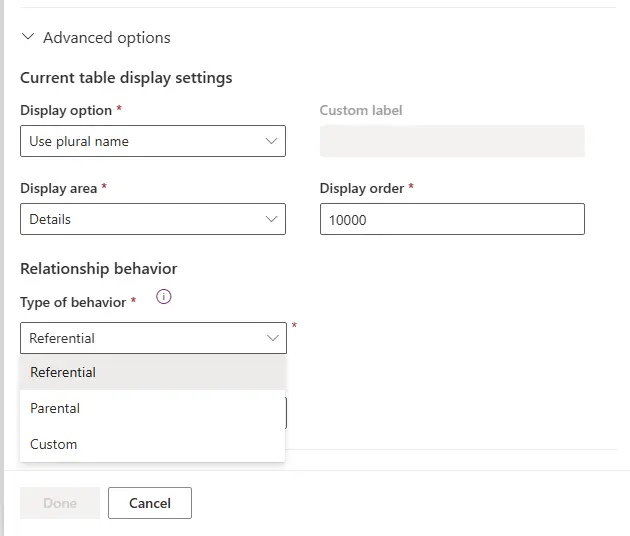
Selecting Parental behaviour for cascade all operations

Parental behaviour cascade actions:

Action Cascade Behaviour Result
Delete Cascade All Children deleted when parent deleted
Assign Cascade All Children reassigned to new owner
Share Cascade All Children shared with same users
Unshare Cascade All Access removed from children
Merge Cascade All Children linked to merged record
Reparent Cascade All Ownership follows lookup changes

Over the relationship you see to the movement parent records:
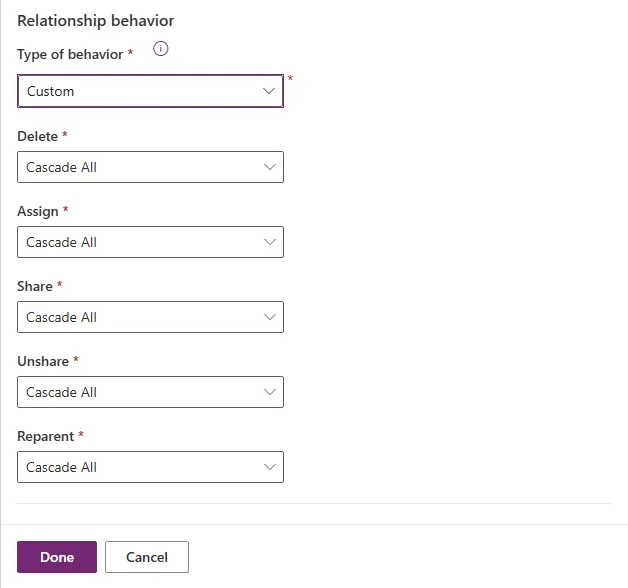
Visual representation of parental cascade behaviour

User experience with parental relationships:

  • Deletion warnings show total child records that will be deleted
  • Assignment operations update all children automatically
  • Shared parent provides access to entire hierarchy
  • No orphaned records possible with this configuration
💡 Pro Tip

Parental behaviour is the safest choice for true parent-child data where children are components of the parent. It prevents orphaned records, maintains data integrity automatically, and provides intuitive user experience. However, be aware that deleting a parent with thousands of children can be slow—Dataverse processes each child deletion individually. For large hierarchies, consider batch deletion patterns.

Independent Child Record Configuration

Referential behaviour should be used in areas where you have parent and child records but you want the parent record to stay on whether or not the child exists (like Account and Contact for example). You likely want configuration where child records remain when the parent is deleted however, you want the ownership to propagate down when assigning.

When to use referential behaviour:

  • Child records have independent business value
  • Children should survive parent deletion (become orphaned)
  • Manual control over child record lifecycle required
  • Flexible ownership and sharing models needed

Configuring referential relationship:

1. In table designer, open the relationship
2. Select Type of behaviour: Referential
3. Configure each cascade action individually:
   - Delete: Remove Link (orphan children)
   - Assign: Cascade All or No Cascade
   - Share: Cascade All or No Cascade
   - Merge: Cascade All or No Cascade
4. Save and publish

Example: Account-Contact referential relationship

  • Delete Account: Remove Link – Contacts remain but Account lookup becomes null
  • Assign Account: Cascade All – Contact ownership follows Account owner
  • Share Account: Cascade All – Shared Account provides access to Contacts
  • Merge Accounts: Cascade All – Contacts link to merged Account record

Available cascade options for referential behaviour:

Cascade Option Effect on Children Common Use
Cascade All Action propagates to children Assign, Share operations
Cascade Active Only affects active children Status-aware operations
Cascade User-Owned Only user-owned children affected Organisation-owned tables
No Cascade Children unaffected Independent child management
Remove Link Lookup cleared, children orphaned Delete operations

A strong example of this is the relationship between Account and Contact records. It is fairly common here to remove the link between the contact and account when deleting an account (as you still want to retain the contact). However the ownership propagates for things like share and reassign.

Referential behaviour flow showing orphaned children on delete
⚠️ Orphaned Record Risk

Referential behaviour with Remove Link creates orphaned records—children with null parent lookup values. While this provides flexibility, orphaned records can cause data quality issues if not managed properly. Consider implementing: automated cleanup flows to identify orphans, required lookup fields where appropriate, or views highlighting records needing parent assignment. Plan orphan management strategy before choosing Remove Link behaviour.

Preventing Parent Deletion with Children

Referential Restrict Delete is used when we want to prevent deletion of records which will still reference other records or child records will still exist. This behavior helps enforce data rules (like "We do not want customers which still have active orders being deleted from the system").

When to use restrict delete:

  • Business rules prohibit deleting parents with children
  • Data integrity requires explicit child cleanup before parent removal
  • Regulatory requirements prevent cascade deletions
  • Users must acknowledge child records before deletion

Common restrict delete scenarios:

  • Cannot delete Customer with active Orders (financial integrity)
  • Cannot delete Product Category with Products (catalogue structure)
  • Cannot delete Department with Employees (organisational integrity)
  • Cannot delete Account with open Cases (support continuity)

Configuring restrict delete:

1. Create or edit relationship
2. Type of behaviour: Referential, Restrict Delete
3. Delete cascade action automatically set to Restrict
4. Configure other cascade actions as needed:
   - Assign: Typically Cascade All
   - Share: Typically Cascade All
5. Save and publish

To give an example, if we had a parent that should be prevented from deletion if it still has child records, we could configure the cascade behavior to be "Restrict Delete". This makes sure the child record is deleted first and this ensures that nothing is kept hanging without a parent or related entity attached. The idea here is to manually handle those records beforehand before deleting the parent record.

User experience with restrict delete:

  • Deletion attempt shows error: "Cannot delete record with related records"
  • Users must manually delete or reassign children first
  • Provides explicit control over deletion process
  • Prevents accidental data loss from cascade deletes

Implementing restrict delete workflow:

1
User attempts to delete parent record

Clicks delete button in model-driven app or executes delete API call.

2
Dataverse checks for child records

System queries child table for records with parent lookup populated.

3
If children exist, deletion blocked

Error message displayed, parent record remains unchanged.

4
User handles child records

Manually deletes children, reassigns to different parent, or cancels deletion.

5
Retry parent deletion after cleanup

Once all children removed, parent deletion succeeds.

💡 Pro Tip

Enhance user experience by adding a subgrid of child records to parent form. When restrict delete is configured, users attempting deletion can immediately see which children are blocking the operation without navigating away. Consider adding quick actions to the subgrid for bulk deletion or reassignment of children, streamlining the cleanup process before parent deletion.

Granular Cascade Control

Custom behavior lets you specify exactly how each type of cascade action (delete, merge, share, assign etc.) should behave independently. This allows you the most control to refine the exact behavior you want for your model. As an example you might want restrict delete behavior but you want the parent to have cascade sharing enabled.

When to use custom behaviour:

  • Need different cascade rules for different operations
  • Restrict delete required but cascade assign/share needed
  • Complex business rules requiring granular control
  • Mix of cascade and non-cascade operations on same relationship

Custom behaviour configuration options:

Example custom configuration:

Action Cascade Setting Rationale
Delete Restrict Prevent accidental data loss, require explicit cleanup
Assign Cascade All Children should follow parent ownership for security
Share Cascade All Sharing parent grants access to entire hierarchy
Unshare Cascade All Removing parent access removes child access
Merge Cascade All Children link to surviving merged record
Reparent No Cascade Changing lookup does not affect ownership

By default the standard is two parent related options: Cascade Configuration (example Cascade behavior) and Cascade Configuration (example Cascade behavior).

Common custom patterns:

  • Protect but cascade: Restrict Delete + Cascade Assign/Share (safeguard data, maintain security)
  • Orphan but follow owner: Remove Link + Cascade Assign (independent records, consistent ownership)
  • Selective cascade: Cascade Active only for status-dependent operations
  • User-owned only: Cascade User-Owned for organisation-owned parent tables

A good rule for deciding which you should use:

  • Is a parent Record on here, a primary or more a lookup which is referenced to filter or relate
  • If your Delete action is set to delete cascade, you should cascade everything unless you have a business reason otherwise as we do not need to maintain consistency for deletes
  • Be aware of how it scales and related cascade configuration items
  • If Restrict is being used, you should Cascade the Assignment and shares as this behavior is aligned together with cascade for the rest
  • Have your Record have cascade all unless you particularly have the scenario where you do not want
  • Save and publish your custom configurations
⚠️ Testing Critical

Custom cascade configurations are complex and easy to misconfigure. Always test thoroughly in development environment before deploying to production. Create test parent records with multiple children, attempt each operation (delete, assign, share, merge), verify cascade behaviour matches expectations. One misconfigured cascade rule can result in data loss or security issues that are difficult to remediate after deployment.

Understanding Individual Cascade Settings

Each cascade action in a custom relationship can be configured with different propagation rules. Understanding these options helps you build precisely the data behaviour your business requires.

All available cascade options:

Option What It Does When to Use
Cascade All Action propagates to all child records regardless of status or ownership Default for most parental relationships and ownership operations
Cascade Active Only affects active child records (Status = Active) Preserve inactive historical records during parent operations
Cascade User-Owned Only affects children owned by users (not organisation-owned) Organisation-owned parent tables with mixed child ownership
Cascade None (No Cascade) Children completely unaffected by parent operation Independent child lifecycle management required
Remove Link Clears parent lookup field, orphans children Delete operations where children should survive independently
Restrict Prevents parent operation if any children exist Enforce explicit child handling before parent changes

Cascade All vs Cascade Active comparison:

Scenario: Delete Account with 5 Contacts (3 Active, 2 Inactive)

Cascade All:
- All 5 Contacts deleted with Account
- No orphaned records remain

Cascade Active:
- Only 3 Active Contacts deleted
- 2 Inactive Contacts remain with null Account lookup
- Preserves historical data while cleaning active records

When to use Cascade Active:

  • Maintain audit trail of inactive historical records
  • Compliance requirements to retain deactivated data
  • Soft delete patterns where inactive = deleted
  • Preserve completed activities when deleting parent cases

When to use Cascade User-Owned:

  • System entities like Queue or Team as parent tables
  • Mixed ownership models (some children user-owned, some org-owned)
  • Service-level operations that should not affect user data
  • Plugin or system-created children that should remain independent

Decision tree for cascade configuration:

  1. Is this a true parent-child relationship? → Parental (Cascade All)
  2. Should deletion be prevented if children exist? → Restrict Delete
  3. Should children survive parent deletion? → Remove Link
  4. Should ownership/sharing propagate? → Cascade All (assign/share)
  5. Need to preserve inactive records? → Cascade Active
💡 Best Practices

Document cascade behaviour decisions in solution documentation. When another developer reviews your data model months later, understanding why specific cascade rules were chosen is critical for maintenance. Include: relationship name, chosen behaviour, rationale for configuration, any exceptions or edge cases. This documentation prevents accidental misconfiguration during future schema updates and helps new team members understand data model design decisions.

The Microsoft Dataverse relationship documentation provides comprehensive information on relationship types, cascade behaviour options, and advanced configuration patterns for building robust data models with proper referential integrity.

Article Info
Beginner
Suitable for those new to Power Platform.
13 min read  ·  March 2026
Prerequisites
Advanced Dataverse table design experience
Understanding of relationship types and lookup fields
Familiarity with data modelling concepts
Experience with model-driven app configuration
Technologies

Need this built for your business?

We design and build production-grade Power Platform solutions for FM, Construction and Manufacturing businesses.

Book a Discovery Call →