Image Preview
1 / 1
HomeLearnDeep Linking in Model-Driven Apps: Complete Guide to URL Parameters and Navigation
⚡ IntermediateModel-Driven AppsPower Automate10 min readFebruary 2026

Deep Linking in Model-Driven Apps: Complete Guide to URL Parameters and Navigation

Learn how to implement deep linking in Power Apps model-driven apps to navigate directly to specific records, views, and forms. This guide covers URL structure, parameter syntax, opening records in edit mode, filtering views, and integrating deep links into Power Automate flows and external applications for seamless navigation.

RL
Rob Lees
Founder & Principal Consultant
Share

Overview

Deep linking enables direct navigation to specific pages within model-driven apps using URL parameters. By constructing URLs with table names, record IDs, view IDs, and form IDs, you can create links that bypass navigation menus and take users directly to the content they need. This improves user experience, enables external system integration, and allows automated workflows to guide users to relevant records.

Prerequisites

  • Model-driven app experience
  • Understanding of Dataverse tables and records
  • Familiarity with GUIDs and record identifiers
  • Basic knowledge of URL structure

Why Use Deep Linking?

Model-driven apps are a powerful way to build data-centric business applications in Power Platform. But when it comes to user experience, one feature that can really elevate your app is deep linking—the ability to navigate users directly to a specific record, view, or form using just a URL.

In this post, we will explore how to implement deep linking using Table Model-Driven Apps.

Common deep linking scenarios:

  • Email notifications with direct links to records requiring action
  • External systems (websites, portals) linking into model-driven apps
  • Power Automate flows directing users to specific records after processing
  • Dashboard widgets that navigate to filtered views
  • Canvas apps that open related records in model-driven apps
  • Custom navigation buttons bypassing standard menu structures

Benefits of deep linking:

  • Improved UX – Users land exactly where they need to be, no manual navigation required
  • Context preservation – Links can include filters, view selections, and form preferences
  • External integration – Other systems can point directly into model-driven apps
  • Workflow enhancement – Automated processes can guide users to next steps

For this example we will get the link directly to our account record for our app.

The structure for the link will look something like below:

https://[environment].crm.dynamics.com/main.aspx?etn=[tablename]&id=[recordid]

We can quite simply construct together by getting the url from within our app and changing the record GUID which would work.

💡 Key Concept

Deep links use URL parameters to specify exactly what content to display in a model-driven app. The base URL points to your Dataverse environment, while parameters (etn for table name, id for record GUID, pagetype for action) tell the app which record to open and how to display it. This enables programmatic navigation without requiring users to click through menus.

One quick way to do this is save Oath an Environment ID and App ID in environment Variables, however doing this requires some configurations.

You would need to define for each environment you are in as the APP ID will change once moving to a new Oath – Most environments is that the url of the app will change and the app id will also change therefore having to u set.

But you could use this if you are on the same environment as the app, do not need the App ID but again this would be the Environment URL which would be dependent on the environment.

Understanding URL components:

Component Parameter Description Example
Base URL N/A Dataverse environment URL https://org123.crm.dynamics.com/main.aspx
Table name etn Logical name of the table etn=account
Record ID id GUID of the specific record id=a7b3c5e2-1234-5678-90ab-cdef12345678
Page type pagetype What action to perform pagetype=entityrecord
App ID appid Model-driven app GUID appid=abc-123-def

Limitations of environment-specific URLs:

  • Environment URL changes between dev/test/prod
  • App ID is unique per environment for the same app
  • Hardcoded links break when deploying across environments
  • Requires environment variables or configuration tables to manage URLs

Example with environment variables:

Store in environment variables:
EnvironmentURL: https://dev-org.crm.dynamics.com
AppID: a1b2c3d4-5678-90ab-cdef-1234567890ab

Construct deep link using concat:
concat(
  EnvironmentVariable(EnvironmentURL),
  '/main.aspx?etn=account&id=',
  RecordGUID,
  '&appid=',
  EnvironmentVariable(AppID)
)
⚠️ Environment Variable Overhead

Managing separate environment variables for each environment's URL and App ID creates deployment complexity. When importing solutions, you must update environment variable values in each target environment. This approach works but requires careful change management and documentation to ensure variables are updated correctly during ALM processes.

Dataverse already stores all the information you need without having to set up environment variables and make sure there all set up correctly. Starting with the environment URL, As we are getting a record ID we can use the SOOO link it may try (or just use the environment URL).

This will return something like below which will gives us the environment URL.
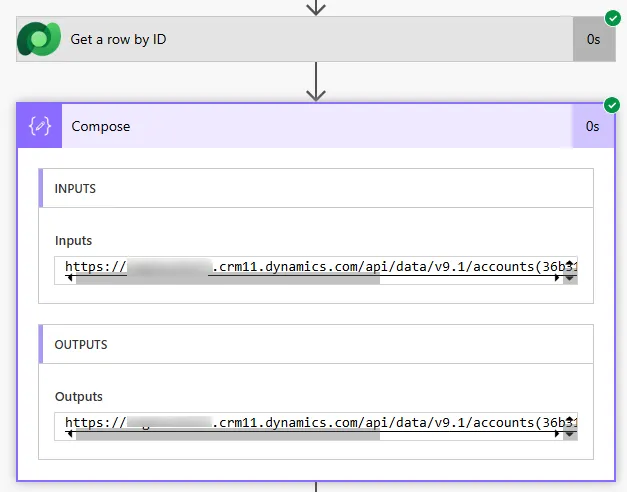
Organization ID annotation containing environment URL

As this includes data we do not need we can just everything before the /api/ by using split expression

split(outputs('Get_row_by_ID')?['body/_organizationid_value@OData.Community.Display.V1.FormattedValue'],'/api/')[0]

Breaking down the expression:

  1. Get the organization value annotation from any Dataverse record
  2. Split the URL at /api/ to separate the base URL from the API path
  3. Take the first element [0] which is the environment base URL
  4. Result: https://org123.crm.dynamics.com (works in any environment)

Within Dataverse there is actually a table that stores this called Model-Driven Apps. We simply need to filter by table for the app we are linking to in which will give us the app id

Getting the App ID dynamically:

List rows from appmodule table:
Table: Model-Driven Apps (appmodule)
Filter: name eq Your App Name

Extract App ID:
first(outputs('List_rows')?['body/value'])?['appmoduleid']

Complete environment-independent deep link:

concat(
  split(outputs('Get_row')?['body/_organizationid_value@OData.Community.Display.V1.FormattedValue'],'/api/')[0],
  '/main.aspx?etn=account&id=',
  outputs('Get_row')?['body/accountid'],
  '&appid=',
  first(outputs('List_app')?['body/value'])?['appmoduleid']
)

Now we have all three bits of information we need to put that all together we can now concat to create the url

concat(
  split(outputs('Get_row_by_ID')?['body/_organizationid_value@OData.Community.Display.V1.FormattedValue'],'/api/')[0],
  '/main.aspx?etn=account&id=',
  outputs('Get_row_by_ID')?['body/accountid']
)

Finally we just need to get the accountid from the initial record which we are linking to the url

outputs('List_rows')?['body/value']?[0]?['accountid']

The output then constructs a full deep link to the record:
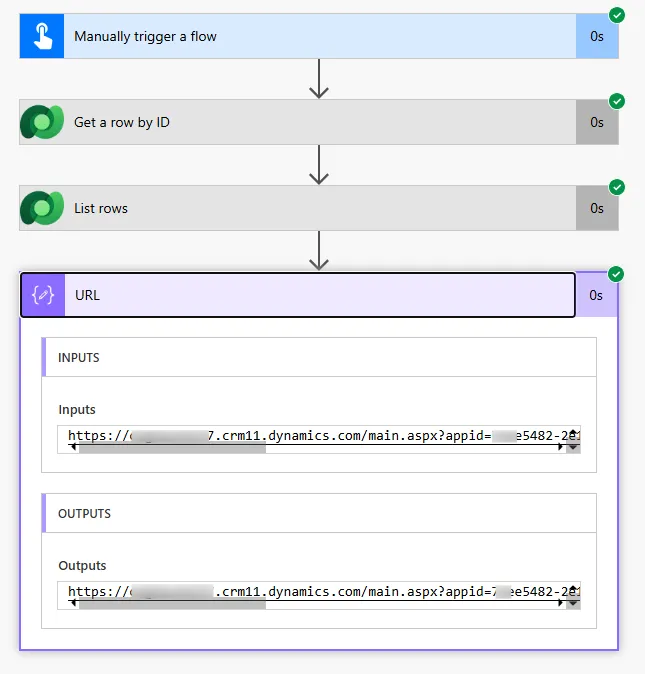
Complete deep link URL constructed dynamically
💡 Pro Tip

The organizationid value annotation appears on every Dataverse record regardless of table type. This means you can use this same pattern across all your flows without table-specific logic. Store the split expression in a Compose action once, then reference it throughout your flow for consistent environment URL extraction across multiple deep links.

Advanced Deep Linking Options

Opening records in edit mode:

concat(
  BaseURL,
  '/main.aspx?etn=account&pagetype=entityrecord&id=',
  RecordID
)

Opening specific forms:

concat(
  BaseURL,
  '/main.aspx?etn=contact&id=',
  RecordID,
  FormGUID
)

Using dynamic context we can see that the App ID, see the 'AppModule' from the dynamic content:

But you would use the appmoduleid from the initial record which we are linking to the url so we can get concat to create the url.

Opening views with filters:

concat(
  BaseURL,
  '/main.aspx?etn=account&pagetype=entitylist&viewid=',
  ViewGUID,
  '&viewtype=1039'
)

Common pagetype values:

pagetype Value Purpose Additional Parameters
entityrecord Open specific record etn, id
entitylist Open view/grid etn, viewid, viewtype
create Open create form etn, formid (optional)
search Open search results searchType, searchText

Creating new records with pre-populated fields:

concat(
  BaseURL,
  '/main.aspx?etn=opportunity&pagetype=entityrecord&extraqs=',
  encodeUriComponent('name=New Opportunity&estimatedvalue=50000')
)

Opening related records:

concat(
  BaseURL,
  '/main.aspx?etn=contact&pagetype=entitylist&parentrecordid=',
  AccountID,
  '&parentrecordtype=account'
)
⚠️ URL Encoding

When using extraqs parameter to pre-populate fields, values must be URL-encoded. Special characters (spaces, ampersands, equals signs, etc.) need encoding or the URL breaks. Use encodeUriComponent() in Power Automate expressions to properly encode field values before concatenating them into deep links, especially when field values come from user input or dynamic data.

Practical Flow Examples

Example 1: Approval notification with record link

Trigger: When a row is added or modified
Condition: Status equals Pending Approval

Compose: Environment URL
  split expression using organizationid value annotation

List rows: Model-Driven Apps
  Filter: name eq Approvals App

Compose: Deep Link
  concat(
    outputs Compose_Environment_URL,
    '/main.aspx?etn=cr_approvalrequest&id=',
    triggerOutputs body cr_approvalrequestid,
    '&appid=',
    first outputs List_apps body value appmoduleid
  )

Send an email (V2):
  Subject: Approval Required
  Body: Please review and approve this request
  Link: Open Record

Example 2: Task assignment with deep link

Trigger: When a task is assigned

Compose: Task Link
  concat(
    split expression for environment URL,
    '/main.aspx?etn=task&id=',
    triggerOutputs body activityid
  )

Post message (Teams):
  Message: New task assigned
  Link: View Task

Example 3: Error notification with context

Send an email (V2):
  Subject: Import Error - Review Record
  
  Body:
  An error occurred importing this record.
  
  Record Details:
  Name: outputs Get_row body name
  Error: body Previous_Action error message
  
  Click here to review and fix the record

Example 4: Canvas app linking to model-driven app

Button OnSelect in canvas app:

Launch(
  Concatenate(
    "https://org.crm.dynamics.com",
    "/main.aspx?etn=account&id=",
    Gallery_Accounts.Selected.AccountID,
    "&appid=abc-123-def"
  )
)
💡 Pro Tip

Create a child flow specifically for generating deep links. Pass in table name, record ID, and app name; the child flow returns the complete URL. This centralises deep link logic, making it reusable across multiple parent flows and easier to maintain when URL structures or requirements change. Update the child flow once, all parent flows benefit.

Locating GUIDs for Advanced Parameters

Method 1: Browser developer tools

1
Open the form or view in your model-driven app

Navigate to the specific form or view you want to link to.

2
Open browser developer tools (F12)

Press F12 or right-click and select "Inspect".

3
Check the URL in the address bar

Look for formid= or viewid= parameters in the URL.

Method 2: Query Dataverse metadata tables

// Get form ID by form name
List rows:
  Table: Forms (systemform)
  Filter: name eq 'Account Main Form' and objecttypecode eq 'account'
  Select: formid, name

// Get view ID by view name
List rows:
  Table: Views (savedquery)
  Filter: name eq 'Active Accounts' and returnedtypecode eq 'account'
  Select: savedqueryid, name

Method 3: Power Apps maker portal

1
Navigate to make.powerapps.com

Go to Tables → Select your table → Forms or Views.

2
Open the form or view

Click to edit the form or view.

3
Check the URL in your browser

The GUID appears in the URL after /forms/ or /views/.

Storing IDs for reuse:

// Create a configuration table
Table: Deep Link Configuration
Columns:
  - App Name (text)
  - Table Name (text)
  - Form Name (text)
  - Form ID (text)
  - View Name (text)
  - View ID (text)

// Query in flows
List rows:
  Table: Deep Link Configuration
  Filter: App Name eq 'Sales Hub' and Table Name eq 'account'

// Use retrieved IDs in deep link construction
⚠️ Form/View ID Changes

Form and view GUIDs change when you create new versions or import from other environments. Don't hardcode these IDs in flows that will be deployed across environments. Use configuration tables or query systemform/savedquery tables dynamically to ensure deep links work correctly after solution imports.

Next Steps

You now understand how to implement deep linking in model-driven apps using dynamic URL construction with Dataverse metadata. This enables environment-independent navigation, improved user experience, and seamless integration between external systems and model-driven apps.

Expand your deep linking capabilities by exploring:

  • Custom page navigation – Deep linking to custom pages within model-driven apps
  • Dashboards and charts – Constructing URLs that open specific dashboards or chart views
  • Quick create forms – Opening streamlined quick create forms via deep links
  • Advanced filtering – Building complex view filters in URL parameters
  • Mobile deep linking – Creating deep links that work in Power Apps mobile app
  • Portal integration – Generating authenticated deep links from Power Pages portals
  • Security considerations – Managing permissions and access control for deep-linked content

The Microsoft Model-driven apps URL parameters documentation provides comprehensive reference information on all available URL parameters, page types, and advanced navigation patterns for building sophisticated deep linking solutions.

Article Info
Intermediate
Assumes working knowledge of Power Automate and basic concepts.
10 min read  ·  February 2026
Prerequisites
Model-driven app experience
Understanding of Dataverse tables and records
Familiarity with GUIDs and record identifiers
Basic knowledge of URL structure

Need this built for your business?

We design and build production-grade Power Platform solutions for FM, Construction and Manufacturing businesses.

Book a Discovery Call →