
Why manual employee onboarding consumes 15+ hours per hire across FM and construction
A facilities management contractor hires a new maintenance engineer starting Monday. The onboarding process begins: HR manually creates personnel file in filing cabinet, emails IT to create Active Directory account and email, emails finance to add to payroll system, emails operations to assign to client site, emails training coordinator to schedule mandatory courses (asbestos awareness, working at height, manual handling), emails line manager to arrange toolbox talk and PPE issue, emails procurement to order uniform and ID card, creates paper welcome pack with policies and procedures, schedules induction meeting for day one. Each step requires manual email, manual follow-up, manual verification of completion. Total HR admin time: 6 hours across 5 days before employee's first day. On day one: another 3 hours shepherding new starter through building access, system logins, policy acknowledgments, training bookings. Post-day-one: ongoing tracking of mandatory training completion, probation review scheduling, competency verification. Total onboarding admin burden: 15–18 hours per new hire.
This pattern repeats across FM, construction, and manufacturing. Manual onboarding processes fragment across multiple people and systems. HR initiates. IT provisions accounts. Finance adds to payroll. Operations assigns work. Training schedules courses. Line managers conduct inductions. Each handoff creates delay and tracking overhead:
- Account creation delayed 2–5 days waiting for IT to process manual email requests — new starter arrives, cannot access systems
- Training bookings require manual coordination between HR and training providers — courses full, new starter waits weeks for next session
- System access requests (CRM, project management, CAFM) require separate tickets to different teams — takes 3–7 days for full access
- Policy acknowledgment tracked on paper forms — HR has no visibility which policies new starter has actually read and signed
- Mandatory training completion tracked in spreadsheets — HR cannot easily identify which new starters have gaps in compliance training
- Equipment/PPE issue requires manual requisition approval then procurement order — new starter waits days for basic work equipment
- Probation reviews scheduled manually in calendar — often forgotten, deadlines missed, employment law compliance risk
The cumulative cost extends beyond HR admin time. New starters sit idle waiting for system access. Mandatory training incomplete when deployed to sites creates compliance risk. Probation reviews missed extend probation periods unnecessarily or create unfair dismissal exposure. Manual tracking failures result in new hires working without required competency verification. Industry data shows manual onboarding processes in operational businesses (FM, construction, manufacturing) cost £800–£1,200 per hire in pure administrative overhead before accounting for delayed productivity and compliance risk.
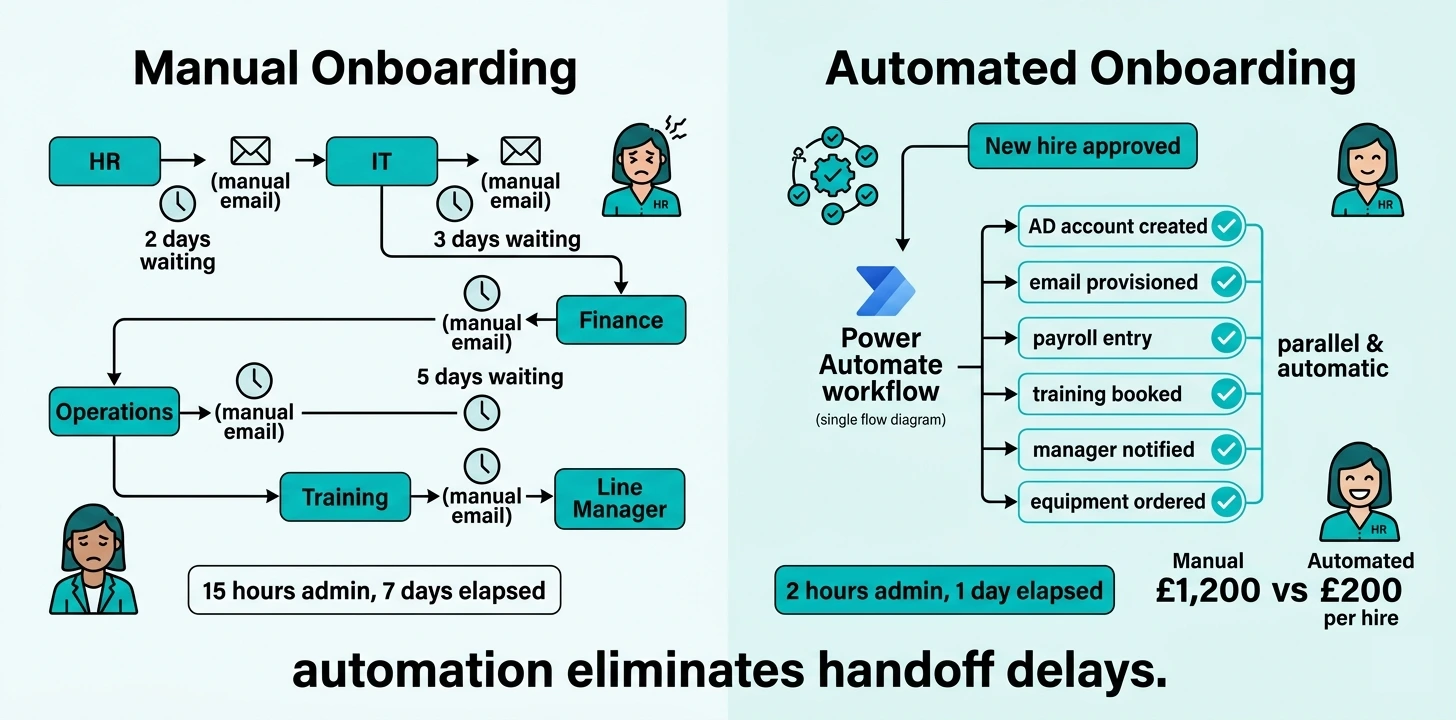
How Power Automate eliminates manual onboarding coordination across systems
Automated employee onboarding built on Power Automate triggers single workflow when new hire approved in recruitment system. Workflow executes all onboarding tasks automatically across multiple systems without manual coordination. HR clicks "approve hire" button. Workflow creates Active Directory account, provisions Office 365 licenses, creates email mailbox, adds employee to payroll system, enrolls in mandatory training courses, generates equipment requisition, creates SharePoint personnel folder, notifies line manager with onboarding checklist, schedules probation review calendar events, sends welcome email to new starter. All tasks execute in parallel within hours. HR admin time: 2 hours (approve hire, verify completions, handle exceptions). New starter arrives day one with email working, systems accessible, training booked, equipment ready.
Here is what changes operationally:
- HR approves new hire in recruitment system (manual)
- HR emails IT requesting AD account creation (manual, 2-day delay)
- IT creates account, emails credentials to HR (manual)
- HR emails finance to add to payroll (manual, 3-day delay)
- Finance creates payroll record (manual)
- HR emails operations to assign site/client (manual)
- HR emails training to book mandatory courses (manual, courses may be full)
- HR creates paper personnel file (manual)
- HR emails line manager with new starter details (manual)
- HR schedules probation review in own calendar (manual, often forgotten)
- Total: 15 hours HR time, 7+ days elapsed, multiple tracking points
- HR approves new hire in recruitment system (one click)
- Power Automate workflow triggers automatically
- Workflow creates AD account via Microsoft Graph API (instant)
- Workflow provisions Office 365 licenses and creates email (instant)
- Workflow creates employee record in finance system via API (instant)
- Workflow creates Dataverse personnel record with all details (instant)
- Workflow enrolls in mandatory training courses via LMS API (instant)
- Workflow creates SharePoint folder structure for personnel docs (instant)
- Workflow sends adaptive card to line manager with onboarding checklist (instant)
- Workflow creates calendar events for probation reviews (instant)
- Workflow sends welcome email to new starter with credentials (instant)
- Total: 2 hours HR time (verification only), 1 day elapsed, zero manual tracking
The transformation is from sequential manual handoffs to parallel automated execution. Manual onboarding requires 8–12 separate actions across 5–7 people taking 5–10 days. Automated onboarding requires 1 approval action triggering 15+ automated tasks completing within 6–12 hours. HR role changes from coordinator chasing multiple people to exception handler verifying automated completions.
Six employee onboarding workflows that eliminate manual HR coordination
Automated employee onboarding delivers greatest time savings when applied to coordination-intensive workflows that currently require manual follow-up across multiple teams:
IT account provisioning and system access
Workflow creates Active Directory account with correct security groups based on role template. Provisions Office 365 licenses (Exchange, Teams, SharePoint). Creates email mailbox. Adds to relevant Teams channels and SharePoint sites. Grants access to business systems (CRM, project management, CAFM, finance) via API calls to each system. Generates temporary password, sends credentials securely to new starter. All access provisioned within 2 hours of hire approval. New starter arrives day one with all systems working. Zero IT tickets required.
Mandatory training enrollment and tracking
Workflow identifies required training courses based on role and industry (FM: asbestos awareness, working at height, manual handling; Construction: CSCS, site safety, lifting ops; Manufacturing: machine safety, COSHH, first aid). Automatically enrolls new starter in next available course dates via LMS API. Sends calendar invitations with course details. Creates tracking record in Dataverse. Sends reminder notifications 7 days before course. Flags to HR if course not completed within 30 days. Eliminates manual training coordination completely.
Policy acknowledgment and document signing
Workflow sends digital forms via Power Apps to new starter on day one: employee handbook acknowledgment, data protection policy, IT acceptable use, health and safety policy, code of conduct. Each policy displayed in app with "scroll to bottom to continue" enforcement. New starter must confirm understanding, provide e-signature with timestamp. All acknowledgments stored in SharePoint personnel folder with audit trail. HR sees real-time dashboard showing which policies signed, which outstanding. Eliminates paper policy packs and manual signature tracking.
Line manager onboarding task assignment
Workflow sends adaptive card to line manager via Teams with onboarding checklist: arrange desk/workspace, issue PPE and uniform, conduct site induction, assign buddy/mentor, schedule first week meetings, verify competency documents, complete probation objectives form. Manager checks off tasks as completed. Workflow tracks progress, sends reminder if tasks outstanding after 3 days. HR sees dashboard showing which managers have completed onboarding tasks, which need follow-up. Eliminates manual manager briefings and completion tracking.
Probation review scheduling and reminders
Workflow calculates probation review dates based on start date and probation period (typically 3 months, 6 months). Creates calendar events for line manager and HR automatically. Sends reminder notifications 14 days before review: "Employee X probation review due on DATE, please complete probation form". Sends form link to manager via Teams. Tracks form completion. Escalates to HR director if review overdue by 7 days. Eliminates forgotten reviews and manual calendar management.
Equipment and PPE provisioning workflow
Workflow identifies required equipment based on role: FM engineer (toolbox, van stock, tablet, safety boots, hi-vis, hard hat), construction site worker (PPE, CSCS card application, site induction pack), manufacturing operative (safety glasses, ear protection, steel toe caps, machine-specific training). Creates equipment requisition in procurement system automatically. Notifies procurement team. Tracks order status. Notifies line manager when equipment ready for collection. New starter arrives day one with equipment ready. Eliminates manual requisition approval delays.
Shared pattern: All six workflows eliminate manual coordination between HR and other teams (IT, finance, operations, training, line managers). Single approval triggers parallel automated tasks across multiple systems. HR role changes from coordinator to exception monitor. Time saved per hire: 12–15 hours (from 15 hours total to 2–3 hours verification/exception handling).
How to build automated onboarding workflows without disrupting HR operations
Automated onboarding deployment succeeds when workflows automate existing processes rather than requiring HR to change procedures. Build automation around current onboarding steps, test thoroughly, then deploy incrementally:
Map current manual onboarding process
Document every step HR performs when new hire approved: who is notified, what accounts created, which systems updated, what documents sent, what training booked. This becomes automation blueprint.
Identify system integration points
Determine which systems have APIs (Active Directory, Office 365, payroll, LMS, CRM). For systems without APIs, identify manual workarounds (email notifications, SharePoint list updates as interim solution).
Build Power Automate workflow incrementally
Start with core workflow: new hire approved → create AD account → create email → notify manager. Test thoroughly. Then add training enrollment. Then policy acknowledgment. Then equipment requisition. Build complexity gradually.
Run parallel with manual process initially
For first 5–10 new hires, run automated workflow AND manual process. Verify automation creates accounts correctly, sends right notifications, books correct training. Build HR confidence before switching to automation-only.
Create HR dashboard for monitoring
Build Power BI dashboard showing: new hires in progress, automated tasks completed vs outstanding, exceptions requiring HR intervention, average time-to-complete per hire. HR monitors automation health rather than executing tasks.
Switch to automation-only mode
Once confidence established (typically after 10–15 successful automated onboardings), disable manual process. HR focuses solely on approval and exception handling. IT/finance/operations teams stop receiving manual emails.
Measure time savings and track ROI
Track HR time per hire before automation vs after. Measure time-to-productivity (days from approval to new starter fully operational). Calculate cost savings: 13 hours saved × £25/hr × 50 hires/year = £16,250 annual saving.
Expand to offboarding workflows
Once onboarding automated, apply same pattern to offboarding: employee leaves → revoke access to all systems → collect equipment → transfer files → exit interview scheduling → final payroll. Same automation principles, opposite direction.
Full onboarding automation deployment typically completes within 6–8 weeks from requirements gathering to automation-only mode. Most complex element is system integration (AD/O365 API connections, payroll system integration). Once core workflow proven, expansion to additional automated tasks takes 1–2 weeks per workflow.
Measurable HR efficiency gains from automated employee onboarding
Automated employee onboarding delivers measurable return on investment across four areas:
Reduction in HR Admin Time
HR admin time per hire reduced from 15 hours to 2 hours through elimination of manual coordination and follow-up chasing
Faster Time-to-Productivity
New starters productive on day one with systems working, training booked, equipment ready versus 3–7 day delay with manual processes
Compliance Training Completion
Automated enrollment and tracking ensures 100% new starters complete mandatory training within 30 days versus 60–70% with manual coordination
HR capacity released for strategic work. FM contractor hiring 50 engineers annually spent 750 hours on onboarding coordination (15 hrs × 50 hires). Post-automation: 100 hours (2 hrs × 50 hires). 650 hours released. At £25/hr HR cost, direct saving: £16,250 annually. More significantly: senior HR time freed from administrative coordination to focus on retention, development, culture. Strategic HR capability increased without additional headcount.
New starter experience improvement. Manual onboarding creates frustrating first-day experience: systems not working, equipment not ready, training not booked, manager unaware of arrival. Automated onboarding ensures everything ready day one. New starter receives welcome email with credentials before start date. Arrives to find email working, systems accessible, training scheduled, manager prepared with onboarding checklist. First impression changes from "disorganised" to "professional". Employee retention correlation: new starters with smooth onboarding have 40% higher 12-month retention than those with chaotic first week.
Compliance risk elimination. Manual tracking of mandatory training creates compliance gaps. Spreadsheet shows training scheduled but cannot verify completion. New starters deployed to sites before safety training complete. Automated system enforces completion: system access or site deployment can be blocked until mandatory training verified. Employment law compliance improves: probation reviews never missed (automated calendar scheduling with escalation), policy acknowledgments verified with e-signature audit trail, right-to-work document expiry tracking automated.
Manual onboarding is administrative overhead businesses can automate away
The 15-hour administrative burden of manual employee onboarding is structural inefficiency, not necessary HR overhead. Manual coordination between HR, IT, finance, operations, training, and line managers creates delay, tracking complexity, and compliance risk. Every new hire requires HR to chase multiple people across multiple systems, verify task completion manually, and maintain spreadsheet tracking. This coordination workload scales linearly with hiring volume: 50 hires = 750 hours coordination time annually.
Automated onboarding workflows eliminate coordination completely. Single approval triggers parallel automated tasks across all systems. AD account created via API. Email provisioned automatically. Training enrolled via LMS integration. Manager notified via Teams. Equipment requisitioned automatically. All tasks execute within hours without HR intervention. HR admin time per hire reduces 85% from 15 hours to 2 hours (approval and exception monitoring only). For businesses hiring 50+ people annually, automation releases 600+ HR hours for strategic work.
The technology exists and is accessible. Power Automate provides workflow automation capability. Microsoft Graph API connects to Active Directory and Office 365. Most payroll and training systems offer API integration. Implementation timeline is 6–8 weeks from requirements to automation-only mode. Investment required is primarily internal time (mapping processes, building workflows, testing integration). External consulting optional for complex system integration.
FM, construction, and manufacturing businesses automating onboarding in 2025–2026 reduce HR admin burden permanently while improving new starter experience and compliance. They onboard faster (day one productivity versus week one delays). They scale hiring without proportional HR headcount increases. They eliminate manual tracking failures that create employment law risk. The competitive advantage is cumulative: every automated hire widens the efficiency gap versus manual competitors.
The question is not whether automated onboarding delivers value — the 85% time reduction and compliance improvement evidence is overwhelming. The question is how much longer your HR team will spend 15 hours per hire on manual coordination that competitors have automated away, how many more new starters will experience chaotic first days waiting for systems that could have been provisioned automatically, and how many more compliance gaps you will tolerate from manual tracking that automation eliminates structurally. Your competitors are onboarding in 2 hours. You are still spending 15. The efficiency gap compounds with every hire.
Ready to replace your spreadsheets?
Book a free 60-minute discovery call and we will show you what is possible for your business.
Book a Discovery Call →