
The hidden cost of manual team coordination in FM operations
Every FM contractor loses operational capacity to manual coordination tasks that add no value. Operations managers spend 45 minutes each morning compiling daily briefings from three different systems. Contract administrators email weekly status updates to clients by manually extracting data from CAFM platforms and spreadsheets. Site supervisors chase engineers for job completion updates via text message and phone calls because nobody knows what was finished today versus what is still outstanding.
This is the manual coordination tax. It consumes 10–15 hours per week in a typical 20-engineer operation and scales linearly with headcount. The work is necessary — teams need briefings, clients need updates, managers need visibility. But the execution is pure waste. Humans manually copying information from one system and pasting it into an email or document adds zero value. The information already exists. The distribution mechanism is the problem.
The cumulative impact is severe:
- Operations managers arrive at 7am to compile briefings instead of managing operations
- Status updates are delayed 24–48 hours because nobody has time to compile them
- Client queries ("what is the status of job X?") take 2–3 hours to answer because data is scattered
- Engineers receive incomplete briefings missing critical information because compilation was rushed
- Leadership visibility is limited to monthly reports because weekly reporting is too labour-intensive
- Team coordination happens via hundreds of fragmented email threads and messages rather than structured channels
Manual coordination does not just waste time. It creates information lag that slows decision-making. When status updates take 48 hours to compile, managers are always working from stale data. When briefings are incomplete because compilation was rushed, engineers arrive on site unprepared. The operational cost is not just the 15 hours spent on manual coordination — it is the compounding effect of slow information flow across the entire business.
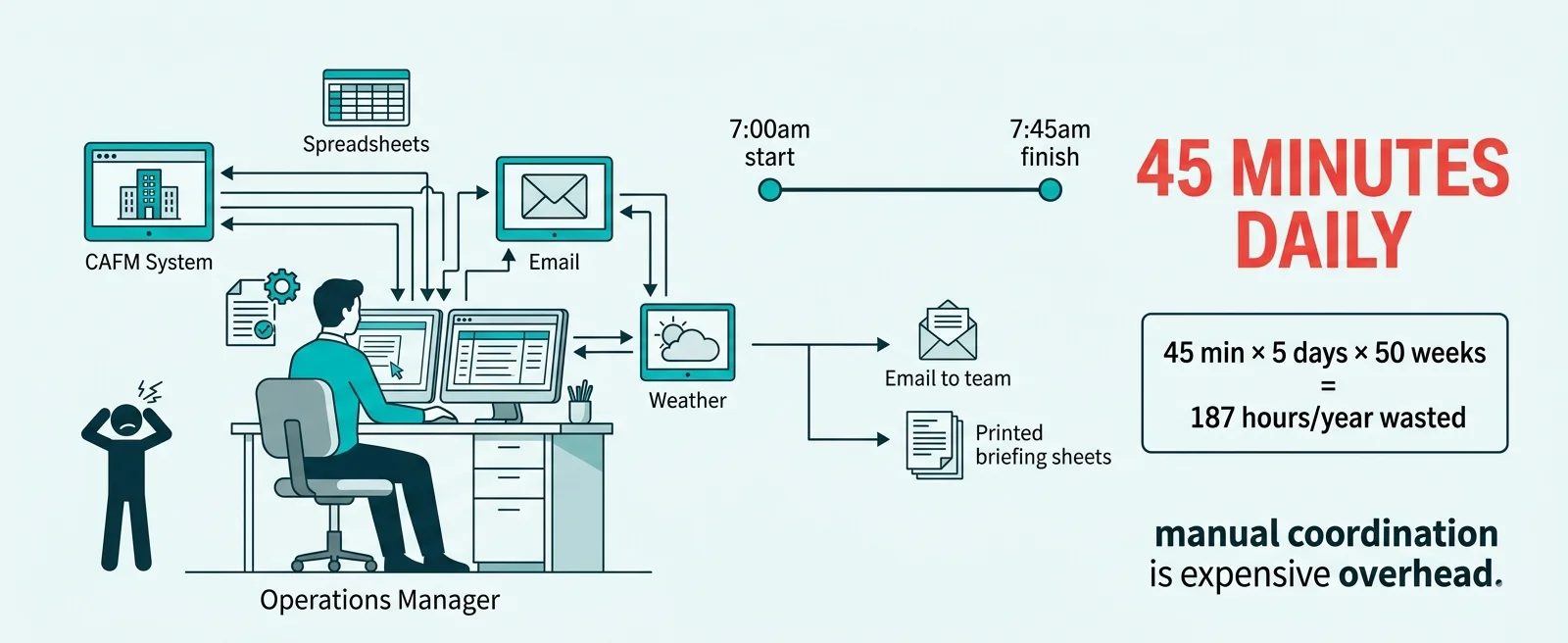
How automated communications work in FM operations
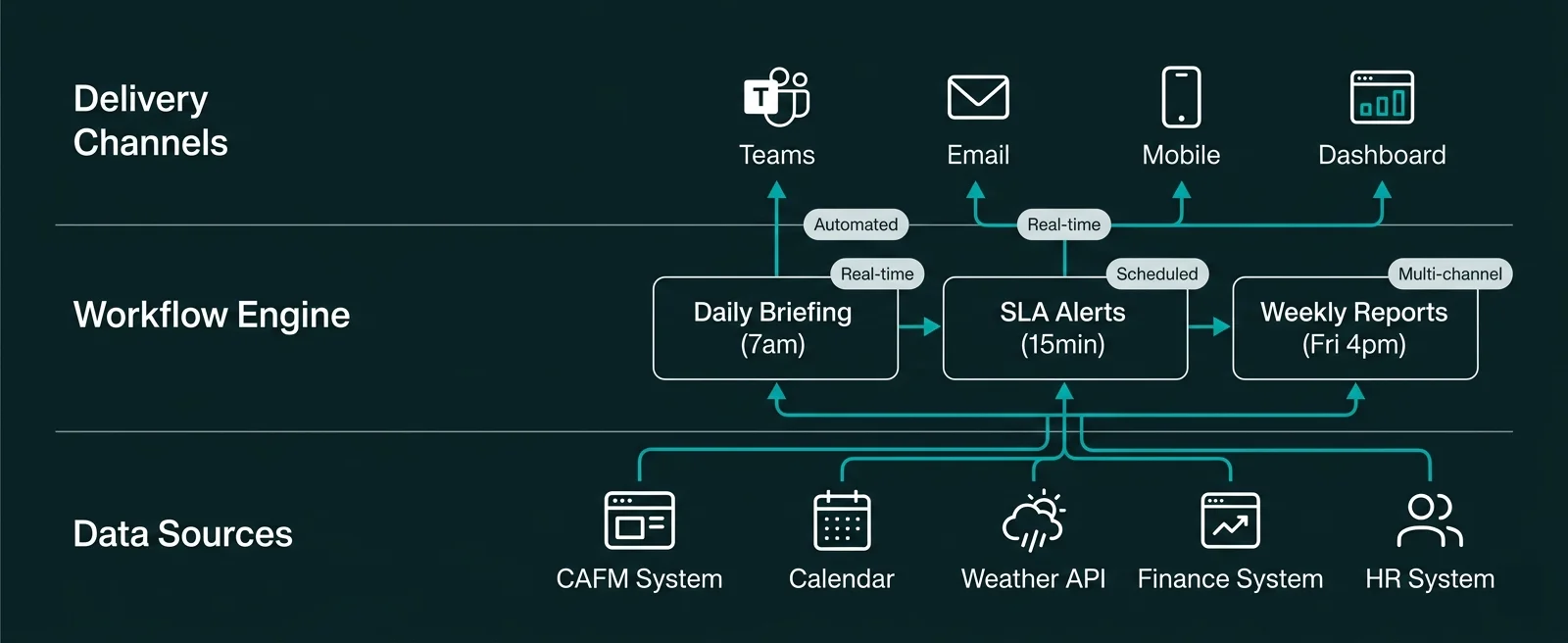
Power Automate eliminates manual coordination by automatically extracting information from your business systems and distributing it to the right people at the right time without human intervention. Instead of an operations manager manually compiling daily briefings, a workflow runs at 7am, pulls live data from CAFM, weather API, and absence calendar, formats it, and posts it to the operations Teams channel automatically.
Here is what changes when you automate team communications:
- Operations manager logs into CAFM system at 7am
- Manually exports today's jobs to spreadsheet
- Checks weather forecast website for site conditions
- Reviews Outlook calendar for engineer absences
- Checks Teams channels for urgent client updates
- Compiles all information into email or Word document
- Sends to operations team and site supervisors
- Total time: 45 minutes daily, 187 hours annually
- Power Automate workflow runs automatically at 7:00am
- Pulls today's jobs from CAFM system via API
- Retrieves weather forecast from weather API
- Queries calendar for who is off today
- Scans priority Teams channels for flagged messages
- Formats all data into structured briefing template
- Posts to operations Teams channel automatically
- Total time: Zero human effort, runs 365 days/year
The fundamental shift is from manual compilation to automatic distribution. The information already exists in your business systems. Power Automate workflows simply extract it, format it, and deliver it to your team without requiring anyone to spend 45 minutes copying data between systems every morning.
Eight communication workflows FM contractors automate first
Communication automation delivers greatest return when applied to repetitive information distribution tasks that happen daily or weekly. These are the eight workflows FM contractors automate first:
Automated daily operational briefings
Workflow runs at 7am every weekday. Pulls today's reactive jobs and PPM visits from CAFM. Retrieves weather forecast for all active sites. Lists engineers on leave or training. Flags urgent client updates from past 24 hours. Posts formatted briefing to operations Teams channel. Engineers see critical info before leaving depot.
Weekly client performance reports
Workflow runs Friday 4pm for each client contract. Extracts week's job completion data, SLA performance, reactive volumes, PPM completion rates from CAFM. Populates Word template with client logo and contract details. Converts to PDF. Saves to SharePoint client folder. Emails to account manager and client contacts automatically.
Real-time SLA breach alerts
Workflow monitors all reactive jobs in CAFM system every 15 minutes. When job with 4-hour SLA reaches 3 hours with no engineer assigned, sends urgent Teams notification to operations manager with job details. If 3.5 hours with no action, escalates to operations director. Cannot miss SLA breaches — alerts are guaranteed.
Compliance certificate expiry reminders
Workflow runs daily checking compliance certificate database. When gas safety, fire alarm test, or engineer competency expires in 30 days, emails reminder to responsible engineer. At 14 days, escalates to HSQE manager. At 7 days, escalates to operations director and flags in compliance dashboard. Automated deadline enforcement prevents expired certificates.
Engineer daily job assignments
Workflow runs at 6:30am. For each engineer, retrieves their assigned jobs for today from CAFM. Creates formatted list with site addresses, client contacts, job descriptions, priority levels. Sends via Teams message directly to each engineer's mobile. Engineer starts day knowing exactly what they are doing without depot visit or phone call.
Contract renewal advance warnings
Workflow monitors contract database daily. When contract renewal date is 6 months away, creates task for account manager to initiate renewal discussions. At 3 months, escalates to commercial manager with contract performance summary. At 1 month, escalates to operations director. Ensures renewals are never forgotten or left to last minute.
New employee onboarding notifications
When new engineer added to HR system, workflow triggers 15-step onboarding sequence. Creates Microsoft 365 account. Assigns to correct Teams channels. Emails IT (laptop request), facilities (access card), line manager (induction meeting). Creates training enrollment tasks. Sends welcome email with first-week schedule. Zero manual coordination required.
Client query auto-acknowledgment and routing
When client emails shared mailbox with query, workflow sends immediate auto-acknowledgment ("we have received your query"). Analyzes email content to determine category (billing, job status, compliance request). Routes to correct department with priority flag. Creates tracking ticket in Power Apps database. Client gets instant response, query reaches right person immediately.
Shared pattern: All these workflows follow the same model — monitor a data source for a condition (time trigger, data change, new record), extract relevant information, format it appropriately, and deliver it to the right people via Teams, email, or mobile notification. Zero manual effort once configured. Runs 24/7/365 with perfect consistency.
How to design effective automated notifications that people actually read
Automated communications fail when they become noise. The worst outcome is teams ignoring automated notifications because they arrive too frequently, contain irrelevant information, or lack actionability. Effective communication automation requires thoughtful notification design:
Priority-based delivery channels
Different message urgency requires different delivery mechanisms. Urgent SLA breach alerts go to Teams notifications (visible immediately, notification sound). Daily briefings post to Teams channels (visible but not disruptive). Weekly reports email to account managers (consumed when convenient). Match channel to urgency. Do not send low-priority information via high-urgency channels or teams ignore all notifications.
Actionable information only
Every automated notification should enable immediate action or decision. "Job J-12345 has exceeded 3-hour SLA — assign engineer now" is actionable. "78 jobs completed this week" is informational noise unless recipient needs that number for a specific decision. If automation cannot answer "what should I do with this information?", do not send the notification.
Timing optimization for consumption
Send daily operational briefings at 7am when operations teams start. Send weekly client reports Friday 4pm so account managers can review before weekend. Send compliance deadline reminders Tuesday morning (highest email open rate). Avoid Monday 8am (inbox overload) and Friday 5pm (ignored until Monday). Optimize send time for actual consumption patterns.
Aggregation over bombardment
Send one daily briefing with 15 items, not 15 separate notifications. Batch non-urgent updates into scheduled digests rather than real-time streams. Exception: truly urgent alerts (SLA breaches, safety incidents) should interrupt immediately. Everything else should batch. Ten notifications per hour train people to ignore all notifications. One well-formatted digest gets read.
Consistent formatting and structure
Use adaptive cards or formatted templates so automated messages are instantly recognizable. "Daily Briefing" always has same header, same section structure, same formatting. Recognition reduces cognitive load. People can scan familiar structure quickly. Random unformatted text blocks require mental effort to parse. Standardized templates enable 10-second comprehension.
How to aggregate data from multiple systems for automated communications
Effective automated communications require pulling data from multiple business systems and combining it into coherent updates. A daily operational briefing might combine CAFM job data, weather forecasts, calendar absences, and Teams channel updates. Here is how Power Automate handles multi-system integration for communication workflows:
Pre-built API connectors
Power Automate includes 1000+ pre-built connectors for common business systems. CAFM platforms, weather APIs, calendar systems, email, Teams all connect via visual configuration — no custom API code required. Workflow designer shows available fields from each system. Select fields to extract, map to output format. Integration complexity hidden behind connectors.
Dataverse as central data hub
Use Dataverse as staging area for aggregated data. CAFM system syncs job data to Dataverse hourly. HR system syncs employee data daily. Finance syncs invoice data weekly. Communication workflows pull from Dataverse rather than hitting source systems repeatedly. Reduces API load, improves performance, enables offline data access.
Real-time vs scheduled data refresh
Design data refresh strategy per source system. Job completion data needs real-time sync (client portal shows live status). Weekly performance metrics can batch-update overnight. Weather forecasts refresh every 6 hours. Balance data freshness requirements against API rate limits and system load. Not everything needs real-time — schedule appropriately.
Error handling and fallback logic
Communication workflows must handle source system failures gracefully. If CAFM API is unavailable at 7am, daily briefing should still send with available data and note "CAFM data unavailable — using yesterday's data." Workflow logs error, notifies IT, retries later. Never fail silently — teams rely on these communications. Build resilient workflows with explicit error paths.
Measurable ROI from automating team communications
Communication automation delivers return on investment in three measurable areas:
Admin Time Saved Weekly
Typical hours reclaimed when manual briefing compilation, status reporting, and coordination replaced by automated workflows
Faster Information Distribution
Reduction in time from "event occurs" to "team informed" when automated notifications replace manual communication
Deadline Compliance Rate
Improvement in meeting deadlines (SLA responses, certificate renewals, contract actions) when automated alerts monitor timelines
Reclaimed operational capacity. When operations managers stop spending 45 minutes daily compiling briefings, that capacity redirects to actual operations management. When contract administrators stop spending 3 hours weekly generating client reports, they can focus on client relationship management. The 10–15 hours per week reclaimed across a 20-engineer operation is equivalent to 0.3–0.4 FTE capacity returning to value-adding work.
Faster operational response times. Manual communication introduces 24–48 hour lag. Daily briefings compiled at 7am contain yesterday's information. Weekly status reports sent Friday reflect data from Wednesday. Automated communications deliver information within minutes of events occurring. SLA breach alerts fire 15 minutes after threshold crossed, not when operations manager happens to check CAFM system. Speed of information flow directly impacts speed of operational response.
Elimination of missed deadlines. Compliance certificate renewals, contract actions, and SLA responses get missed because humans forget or get busy. Automated deadline monitoring does not forget. Certificate expires in 30 days — reminder sends automatically. Contract renewal due in 6 months — task creates automatically. SLA approaching breach — alert fires automatically. The business impact of a single missed gas safety certificate (HSE enforcement notice, client relationship damage, potential contract loss) exceeds the cost of implementing automated compliance monitoring.
Improved team alignment and visibility. When critical information reaches the right people automatically rather than through fragmented email chains and verbal updates, operational teams maintain better situational awareness. Engineers know their daily assignments before leaving home. Account managers see client performance metrics without chasing data. Leadership tracks operational KPIs in real-time rather than waiting for monthly reports. Better information flow enables better decisions.
How to deploy communication automation in 4 weeks
Communication automation follows a phased rollout model. Most FM contractors implement their first automated communication workflows within 3–4 weeks from scoping to production deployment:
Identify highest-pain manual communication
Choose one manual coordination task consuming most time — typically daily operational briefings or weekly client reporting.
Map data sources and recipient needs
Document what information goes into manual briefing, where it comes from (CAFM, calendar, spreadsheets), and what format recipients need.
Build Power Automate workflow
Create workflow pulling data from source systems, formatting output, delivering via Teams/email. Test with sample data to verify formatting and timing.
Pilot with operations team
Run automated workflow alongside manual process for 1 week. Compare output quality, timing, completeness. Gather feedback on format and content.
Refine based on feedback
Adjust formatting, add missing data sources, optimize send timing. Typical refinements: adding weather forecast, including engineer assignments, highlighting urgent items.
Decommission manual process
Once team confirms automated version meets requirements, stop manual compilation. Automated workflow becomes primary communication mechanism.
Measure time saving
Track hours no longer spent on manual coordination. Typical first workflow saves 3–6 hours weekly. Document ROI for business case to automate additional workflows.
Expand to next communication workflow
Apply pattern to automate client reporting, compliance alerts, SLA monitoring, or assignment notifications using same platform and approach.
Most FM contractors complete steps 1–7 for their first communication workflow in 3–4 weeks. Once the pattern is proven, subsequent workflows deploy faster because the integration patterns, data connections, and team familiarity already exist. Full automation of 6–8 core communication workflows typically completes within 3–4 months.
Manual coordination is structural waste your business can no longer afford
The manual coordination tax — 10–15 hours weekly spent compiling briefings, generating reports, chasing updates, and distributing information — is structural waste that every FM contractor carries. The information already exists in your business systems. The distribution mechanism is the problem, not the data availability.
Power Automate eliminates this waste by doing what computers do better than humans: monitoring data sources continuously, extracting relevant information instantly, formatting it consistently, and delivering it to the right people at the right time without error or delay. This is not about replacing human judgment or relationship management. This is about removing humans from the repetitive data-copying loop that consumes operational capacity.
FM contractors who automate communication workflows in 2026 gain compounding advantages. The 10–15 hours weekly reclaimed redirects to client-facing work, strategic planning, and operational improvement. Information flows faster, enabling faster decisions and faster responses. Deadlines are monitored automatically, preventing compliance failures and missed renewals. Teams maintain better situational awareness without requiring manual coordination overhead.
The businesses delaying communication automation are making a strategic choice to accept structural inefficiency. Every manual briefing compiled, every status report typed, every coordination email sent is operational capacity being consumed by work that automation handles better. The technology exists, the integration patterns are proven, and the ROI is measurable within weeks.
The question is not whether communication automation delivers value — the question is how much longer your business will continue paying the manual coordination tax when the alternative costs less, delivers faster, and works more reliably. The businesses automating in 2026 are redirecting 500–800 hours annually from manual coordination to value-adding work. The businesses waiting are falling 12–18 months behind competitors who have already eliminated this structural waste.
Ready to replace your spreadsheets?
Book a free 60-minute discovery call and we will show you what is possible for your business.
Book a Discovery Call →