
Why email approval chains fail FM contractors
Every FM contractor runs on approvals. Purchase orders for materials, holiday requests from engineers, RAMS submissions for high-risk work, variation orders from clients, supplier invoices over £5K, contract extensions, recruitment sign-offs. Dozens of approval decisions every week that require a manager's authorisation before work can proceed.
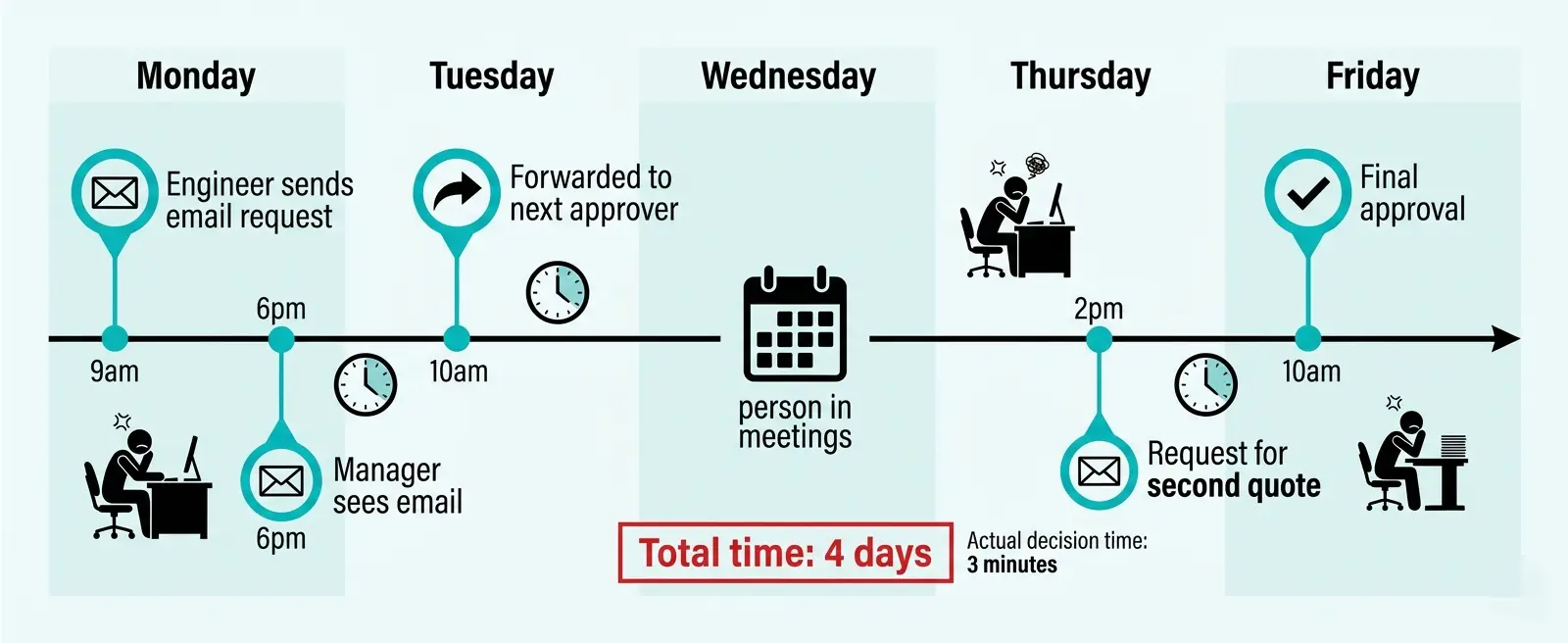
The default mechanism is email. An engineer needs approval for a £2,500 pump replacement. They send an email to their line manager. The line manager is on site and does not see the email until 6pm. They forward it to the contracts manager for budget approval. The contracts manager is in meetings all day Wednesday. They respond Thursday morning asking for a second quote. The engineer gets the second quote Thursday afternoon and emails both options. The contracts manager approves Friday morning. Total elapsed time: 4 days. Actual decision time: 3 minutes.
This is not a pathological example. This is normal. Email approval chains introduce structural delay into every decision because:
- Approval requests look identical to regular emails — no visual priority signal
- No automatic escalation if approver does not respond within SLA timeframe
- Approvers cannot see approval history or understand wider context
- No audit trail of who approved what, when, and why
- Requests get lost in email threads when multiple people are CC'd
- No reporting on approval bottlenecks or average response times
The cumulative cost is not measured in individual delays. It is measured in operational velocity. A business where decisions take 3–5 days to approve is structurally slower than a business where decisions are approved in 3–5 hours. That velocity difference compounds across hundreds of decisions per month.
How automated approval workflows eliminate email delays
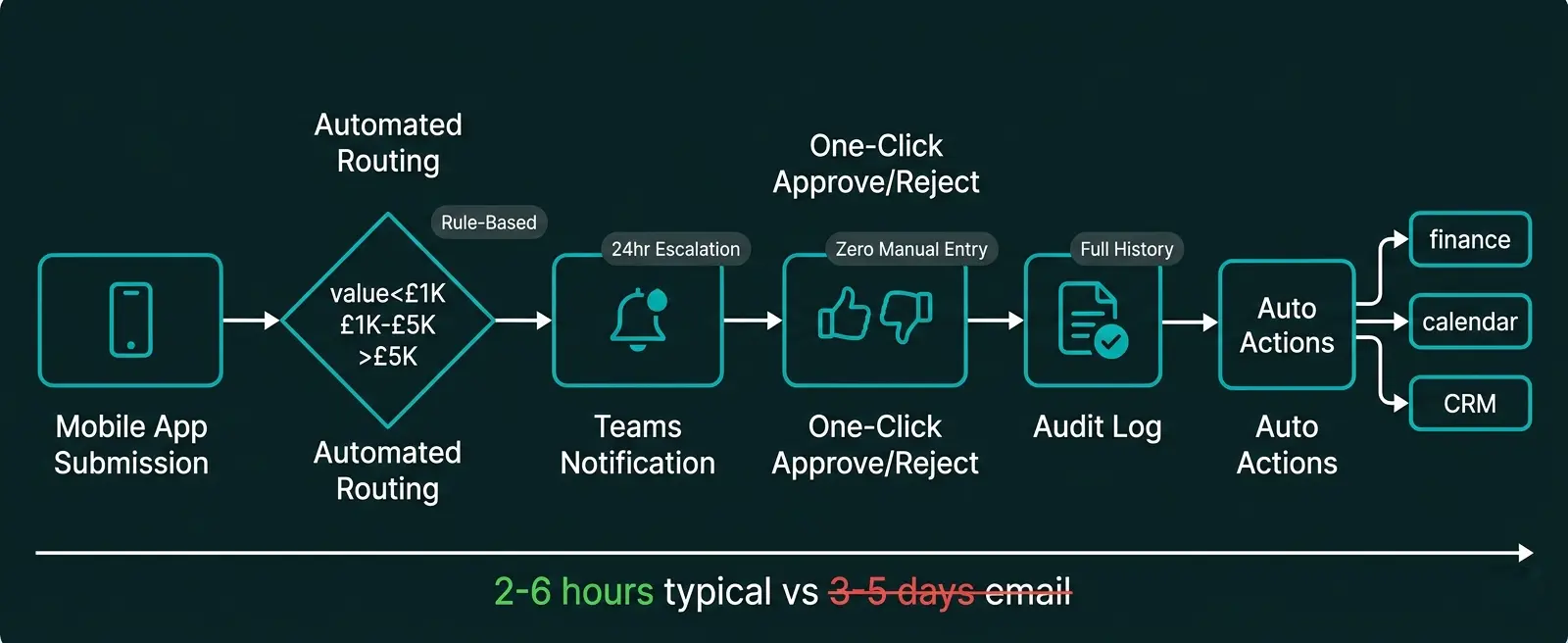
Power Automate replaces email approval chains with structured workflows that route requests to the correct approver, enforce response deadlines, escalate when necessary, and log every decision automatically. Instead of sending an email and hoping someone sees it, approval workflows deliver requests directly to the approver with context, priority, and deadline clearly visible.
Here is what changes when you replace email approvals with Power Automate workflows:
- Engineer emails line manager with purchase request
- Manager forwards to contracts manager for budget approval
- Contracts manager may not see email for 24–48 hours
- Request gets lost in email thread if multiple people involved
- No automatic reminder if approver does not respond
- No audit trail of approval decision or reasoning
- Average approval time: 3–5 days
- Engineer submits request via Power Apps mobile form
- Workflow automatically routes to correct approver based on value and type
- Approver receives notification in Teams with all context visible
- Can approve/reject directly from Teams or email with one click
- Auto-escalates to senior manager if not actioned within 24 hours
- Every decision logged with timestamp, approver name, and comments
- Average approval time: 2–6 hours
The improvement is not incremental. Automated approval workflows are 10–15 times faster than email chains for the same decision. The speed gain comes from three factors: requests cannot be missed (they appear as actionable notifications, not buried emails), approvers can act immediately (approve/reject in one click without composing a reply), and escalation is automatic (no request sits in an inbox for a week).
Five high-impact approval workflows every FM contractor should automate
Approval workflows deliver the greatest return when applied to high-frequency, rules-based decisions. These are the approval processes FM contractors automate first:
Purchase order approvals
Engineers request materials or services via mobile app. Workflow routes to line manager if under £1K, contracts manager if £1K–£5K, operations director if over £5K. Approver sees supplier, cost, job reference, and urgency. Approves or rejects with single click. Approved orders automatically create PO in finance system.
Holiday and absence requests
Engineers submit leave requests via Teams or mobile app. Workflow checks remaining allowance, flags if resource conflict exists (e.g., 3 engineers already off that week), routes to line manager. Approved requests update Outlook calendar, notify payroll, and sync to workforce planning dashboard automatically.
RAMS and permit-to-work approvals
Engineers submit risk assessments and method statements digitally. Workflow routes to HSQE manager for safety review. If high-risk work (e.g., working at height, confined space), automatically escalates to operations director for second approval. Cannot proceed until all approvals complete. Full audit trail for compliance.
Contract variation approvals
Client requests scope change or additional work. Account manager logs variation request with cost impact. Workflow routes to commercial manager for margin review, then operations director for capacity check, then client for written approval. All approvals logged. Variation automatically updates contract value in CRM.
Shared pattern: All these workflows involve routing a request to the correct person based on rules (value, risk level, department), capturing their decision with one click, and triggering automatic actions when approved. Automating these four approval types typically reduces average approval time from 3–5 days to 4–8 hours.
Automating internal communications beyond approval workflows
Approval workflows are the most obvious use case for Power Automate, but internal communications automation extends far beyond approvals. FM contractors are using workflow automation to eliminate manual coordination, status updates, and information distribution across operations teams:
Automated daily briefings and shift handovers
Every morning at 7:30am, Power Automate generates a briefing document pulling live data from CAFM system (today's jobs), weather API (site conditions), absence calendar (who is off), and urgent client updates from Teams channels. Posts automatically to operations Teams channel and emails to all site supervisors. Eliminates 45 minutes of manual briefing preparation daily.
SLA breach alerts and escalation
When a reactive job is logged in CAFM system with 4-hour SLA, Power Automate monitors elapsed time. If 3 hours pass with no engineer assigned, workflow sends urgent notification to operations manager. If 3.5 hours pass, escalates to operations director and client account manager. No manual monitoring required — breaches are impossible to miss.
Automated weekly performance reporting
Every Friday at 4pm, Power Automate pulls data from CAFM (jobs completed, SLA performance), finance system (invoices raised), and HR system (engineer utilisation). Generates summary report, populates Word template, saves to SharePoint, and emails to senior leadership. Replaces 3 hours of manual report compilation every week.
Compliance deadline reminders and escalation
Power Automate monitors compliance certificate expiry dates in SharePoint document library. When gas safety certificate is due for renewal in 30 days, sends reminder to responsible engineer. If no action taken within 7 days, escalates to HSQE manager. If still no action at 14 days, escalates to operations director and flags in compliance risk dashboard.
New employee onboarding workflows
When new engineer added to HR system, Power Automate triggers onboarding workflow: creates Microsoft 365 account, assigns to correct Teams channels, enrolls in mandatory training courses, creates tasks for IT (laptop setup), facilities (access card), and line manager (induction meeting). Sends welcome email with first-week schedule. Entire onboarding sequence automated.
These workflows share a common pattern: they eliminate repetitive manual communication tasks that consume admin time but add no value. The information already exists in various systems — Power Automate simply extracts it, formats it, and delivers it to the right people at the right time without human intervention.
Measurable impact: what changes when you automate approvals and internal comms
The return on investment from automating approval workflows and internal communications is not abstract. It manifests in three measurable areas:
Approval Time Reduction
Typical reduction in average approval cycle time when email chains replaced with Power Automate workflows
Admin Time Saved Weekly
Average hours reclaimed per operations team when manual coordination and reporting workflows automated
SLA Breach Prevention
Reduction in missed deadlines when automated alerts and escalation workflows monitor critical timelines
Faster operational velocity. When approval decisions that previously took 3–5 days now complete in 4–8 hours, the entire business moves faster. Engineers can start work sooner. Clients receive responses quicker. The cumulative effect of removing 2–3 days from dozens of decisions per month is significant operational leverage.
Reduced admin overhead. Manual tasks like compiling daily briefings, chasing approvals, sending compliance reminders, and generating weekly reports consume 10–15 hours per week in a typical 20-engineer FM operation. Automating these workflows reclaims that capacity for higher-value work.
Improved compliance and audit readiness. Email approval chains provide weak audit trails. Automated workflows log every decision with timestamp, approver identity, and supporting documentation. When an auditor asks "who approved this high-risk work and when?", you generate the answer in 30 seconds rather than searching through email archives for three hours.
Better visibility for leadership. When approvals and communications flow through Power Automate instead of email, leadership gains visibility into operational bottlenecks. Approval dashboards show which managers are slow to respond, which approval types cause most delay, and where process improvements would have greatest impact. Email chains hide this data — workflows expose it.
Addressing the "we tried workflow tools before" objection
Every FM contractor considering Power Automate raises similar concerns, usually based on failed attempts with earlier workflow tools. Here is what the objections sound like and what the reality is in 2026:
"Our team will not use another approval tool"
Reality: Power Automate approvals appear in tools your team already uses — Teams, Outlook, mobile notifications. They do not need to log into a separate workflow portal. Approvers click "Approve" directly in the notification. Adoption is near-100% because there is nothing new to learn.
"Building workflows is too technical for our team"
Reality: Low-code platforms like Power Automate use visual designers, not code. Your operations manager can build a holiday approval workflow in 30 minutes using drag-and-drop interface. For complex integrations, a Power Platform specialist builds it once — you do not need permanent developers.
"Workflows become too rigid and slow us down"
Reality: Well-designed workflows include override mechanisms for urgent cases. Approvers can escalate immediately to senior manager if situation requires it. The workflow enforces the process for normal cases (95% of approvals) while allowing flexibility for exceptions.
"We tried workflow software in 2015 and nobody used it"
Reality: 2015 workflow tools were standalone systems requiring separate logins. Modern Power Automate integrates into Microsoft 365 that your team already uses. The barrier to adoption has been removed — workflows appear where people already work.
"Email works fine for us, why change?"
Reality: Email works until you measure it. Track average approval time for your next 20 purchase orders. Measure how many get lost or delayed because approver did not see the email. Count hours spent chasing approvals. The hidden cost of email becomes visible when measured.
"This will cost thousands to implement"
Reality: Power Automate is included in Microsoft 365 licences most FM contractors already pay for. Building 5–8 core approval workflows typically costs £3K–£8K depending on complexity. ROI period is 3–6 months based on admin time saved. This is not enterprise software pricing.
How to deploy approval workflows in 6 weeks
Most FM contractors deploy their first automated approval workflows within 4–6 weeks from initial scoping to production rollout. The implementation follows a proven pattern:
Identify highest-pain approval process
Choose one approval workflow that causes most operational delay — typically purchase orders, RAMS approvals, or holiday requests.
Map current email approval process
Document who approves what, at what value thresholds, what information they need, and what happens after approval. This becomes your workflow blueprint.
Build Power Automate workflow
Create approval workflow using Power Automate designer. Configure routing rules, approval actions, escalation timers, and post-approval automations.
Create submission interface
Build simple Power Apps form or Teams adaptive card for submitting requests. Mobile-friendly so engineers can submit from site.
Test with pilot team
Deploy to 3–5 engineers and 1–2 approvers. Run parallel with email process for 2 weeks. Measure approval time improvement and gather feedback.
Train wider team
Roll out to all engineers and approvers. 15-minute training session showing how to submit requests and how to approve. Most users need no training — interface is self-explanatory.
Decommission email approval
Once workflow adoption reaches 80%+, announce that email approvals will no longer be actioned. All requests must go through workflow. Teams adapt within days.
Expand to next workflow
Apply lessons learned to automate holiday requests, RAMS approvals, or invoice approvals using same platform and approach.
Most FM contractors complete steps 1–7 for their first approval workflow in 4–6 weeks. Once the first workflow proves value, subsequent workflows deploy faster because the platform, integration patterns, and team capability already exist. Full automation of 5–8 core approval processes typically completes within 3–4 months.
The era of email approval chains is ending
Email served as the default approval mechanism for two decades because there was no better alternative that was simple to deploy. That constraint no longer exists. Power Automate delivers structured approval workflows that integrate into tools your team already uses, deploy in weeks not months, and cost a fraction of dedicated workflow platforms.
The businesses that eliminate email approval chains in 2026 gain a permanent operational advantage. Decisions that take competitors 3–5 days complete in 4–8 hours. Admin time spent chasing approvals and compiling reports is redirected to client-facing work. Compliance audit trails are instant rather than requiring days of email archaeology. Operational velocity increases measurably.
The technology barrier has been removed. The deployment complexity has been solved. The economic case is proven. Every day your business continues to run approvals via email is a day you are operationally slower than you need to be. The question is not whether to automate approval workflows — the question is which workflows to automate first and how quickly you can execute the transition.
For FM contractors still managing approvals via email in 2026, the cost of waiting is now higher than the cost of change. The businesses that move first establish a 6–12 month operational velocity advantage that competitors struggle to close. By the time late adopters implement workflow automation in 2027, the leaders will have automated their entire operational communications stack and moved even further ahead.
Ready to replace your spreadsheets?
Book a free 60-minute discovery call and we will show you what is possible for your business.
Book a Discovery Call →