
Why rule-based automation is reaching its limits in FM operations
Traditional Power Automate workflows excel at rule-based logic. If job value exceeds £5K, route to operations director for approval. If compliance certificate expires in 30 days, send reminder email. If SLA breaches 3 hours, escalate to management. These are deterministic rules — same input always produces same output. Clear conditions, predictable outcomes.
But FM operations contain scenarios that cannot be reduced to simple rules. How do you automatically classify a client email that says "the heating system is making weird noises and the office temperature feels off" — is that a reactive maintenance request, a PPM defect, or an urgent breakdown? How do you prioritise 15 incoming job requests when some say "urgent", some say "ASAP", and some provide no urgency indicator at all? How do you extract meaningful information from engineer site notes that say "fixed the thing that was broken near the boiler" without structured data fields?
This is where rule-based automation breaks down:
- Client emails contain unstructured text that cannot be parsed with simple keyword matching
- Job descriptions use inconsistent terminology — same issue described 10 different ways
- Priority indicators are subjective and context-dependent — "urgent" means different things to different clients
- Site notes from engineers lack standardisation — valuable information buried in free text
- Routing decisions require understanding intent and context, not just keyword presence
- Predictive maintenance requires analysing patterns across thousands of historical jobs
Traditional automation requires humans to handle ambiguous cases. Email arrives with unclear request — human reads it, interprets intent, classifies correctly, routes appropriately. The automation handles simple cases; humans handle everything requiring judgment. This is the ceiling of rule-based workflows — they cannot handle ambiguity, nuance, or context-dependent decisions.
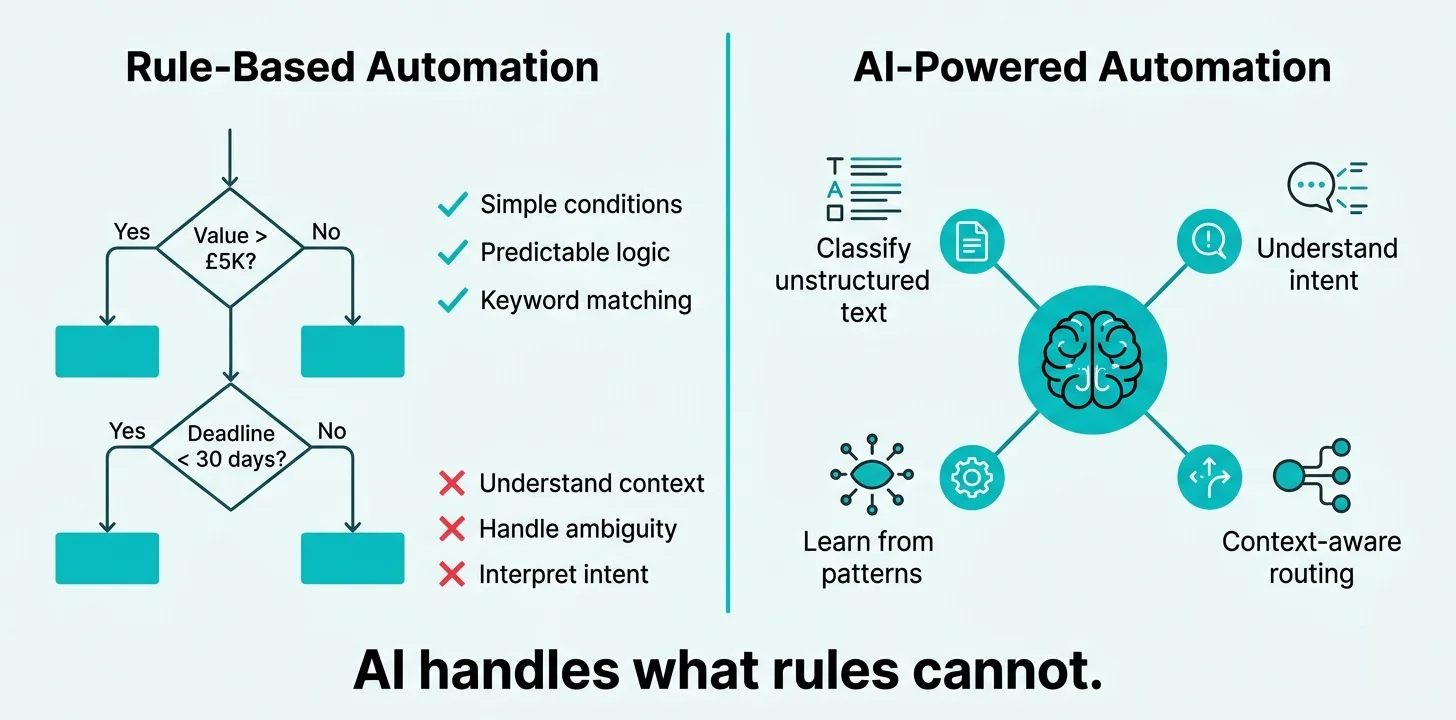
How AI capabilities integrate into Power Automate workflows
AI integration in Power Automate does not require data science expertise or custom machine learning models. Microsoft provides pre-built AI capabilities through AI Builder and Azure AI services that embed directly into workflows using visual configuration. The workflow designer includes AI actions alongside standard automation actions — send email, create record, analyse text with AI, route based on classification.
Here is what changes when you add AI capabilities to automation workflows:
- Client email arrives in shared mailbox
- Workflow checks subject line for keywords: "urgent", "breakdown", "emergency"
- If keyword found, flag as high priority and route to operations manager
- If no keyword, route to general job queue
- Misses requests where urgency implied but keyword absent
- Cannot distinguish genuine urgency from routine requests labelled "urgent"
- Requires human to review and reclassify mis-routed requests
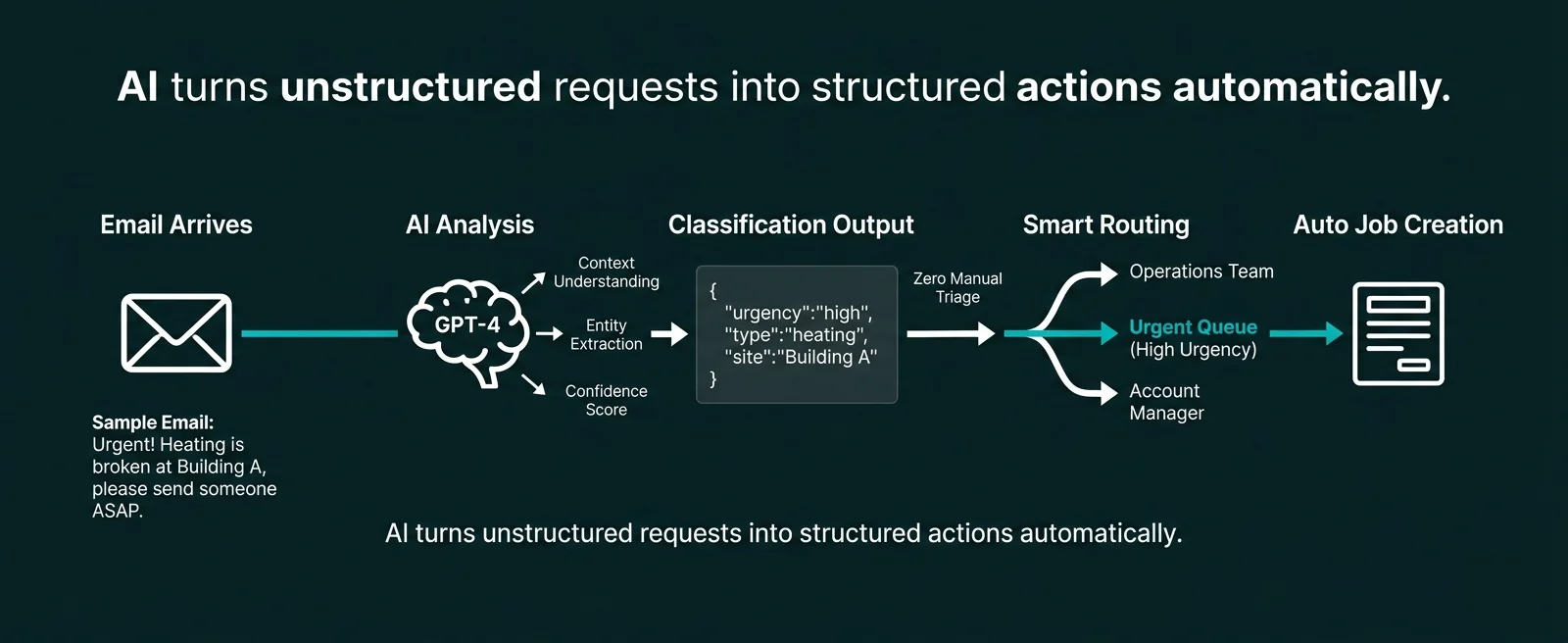
- Client email arrives in shared mailbox
- Workflow sends email content to GPT-4 model with prompt: "Analyse this maintenance request. Classify urgency (low/medium/high/critical). Identify issue type (heating/plumbing/electrical/access). Extract key details."
- AI analyses full email content understanding context and intent
- Returns structured classification: urgency=high, type=heating, details="boiler pressure dropping, offices cold"
- Workflow routes to correct engineer based on AI classification
- Creates job record in CAFM with AI-extracted details pre-populated
- 95%+ classification accuracy — human review only for edge cases
The integration point is straightforward: workflow receives unstructured input (email text, engineer notes, client feedback), passes it to AI service with specific instructions, receives structured output (classification, extracted entities, sentiment score), uses that output to make routing decisions or populate data fields. The AI handles ambiguity and context understanding. The workflow handles deterministic routing and data operations.
Six high-value AI workflows transforming FM operations
AI-powered automation delivers greatest return when applied to workflows involving unstructured text analysis, classification, or pattern recognition. These are the six AI workflows FM contractors implement first:
Intelligent email classification and routing
Client emails arrive in shared mailbox. AI analyses full email content, classifies request type (reactive job, quote request, complaint, invoice query, compliance question). Extracts key information (site, urgency, issue type). Routes to correct department automatically. Creates draft job record or support ticket with AI-extracted details. Eliminates manual email triage completely.
Engineer site notes processing and knowledge extraction
Engineer completes job, enters free-text notes: "replaced faulty valve on 3rd floor heating circuit, system pressure restored to normal, advised FM that annual service due next month". AI extracts: parts_used="valve", location="3rd floor heating", action_taken="replacement", followup_required="annual service next month". Auto-populates CAFM fields, creates reminder task, updates asset service history.
Client feedback sentiment analysis and escalation
Client submits feedback via survey or email. AI analyses sentiment (positive/neutral/negative/very negative). For negative sentiment, extracts specific issues mentioned. Auto-escalates very negative feedback to account manager with issue summary. Positive feedback triggers thank-you response and flags for case study consideration. Aggregates sentiment trends in monthly client health dashboard.
Predictive maintenance failure pattern detection
AI analyses 24 months of reactive maintenance history for heating systems. Identifies pattern: sites with 3+ call-outs in 60 days have 87% probability of major failure within next 90 days. Workflow automatically flags high-risk assets, creates preventive inspection tasks, notifies account managers. Enables proactive intervention before costly breakdowns occur.
Automated document summarisation and action extraction
Client sends 15-page tender document PDF. AI reads entire document, generates 1-page executive summary highlighting: submission deadline, key requirements, mandatory certifications, pricing structure, evaluation criteria. Extracts action items: "obtain ISO 14001 certificate by 20th Dec", "prepare 5-year track record evidence", "complete technical questionnaire". Creates tasks with deadlines automatically.
Intelligent response drafting for common queries
Client asks: "Can you provide gas safety certificate status for all our London sites?" AI searches compliance database, identifies 12 London sites, retrieves gas safety status for each, drafts email response: "All 12 London sites have valid gas safety certificates. Next renewals: Site A (15 Jan), Site B (3 Feb)..." Account manager reviews AI draft, approves, sends. 10-minute manual task completed in 30 seconds.
Shared pattern: All these workflows use AI to handle the ambiguous, unstructured, context-dependent parts of business processes that rule-based automation cannot address. The AI analyses text, understands intent, extracts information, or identifies patterns. The workflow uses that AI output to make routing decisions, populate data fields, or trigger actions. Human oversight for edge cases; AI handles 85–95% automatically.
How to actually build AI-powered workflows without data science expertise
AI integration in Power Automate does not require machine learning expertise, Python coding, or data science teams. Microsoft provides two integration paths: AI Builder for pre-built AI models, and Azure OpenAI Service for advanced capabilities like GPT-4. Both integrate into workflows using visual configuration.
AI Builder - pre-trained models for common scenarios
AI Builder provides ready-to-use AI models: text classification (categorise emails into types), entity extraction (pull names/dates/locations from text), sentiment analysis (positive/negative/neutral), form processing (extract data from invoices/receipts), object detection (identify items in images). No training required — connect to Power Automate action, configure inputs/outputs, deploy. Ideal for standard AI tasks where pre-built models fit requirements.
Azure OpenAI Service - GPT-4 for complex understanding
For tasks requiring deeper understanding, Power Automate can call Azure OpenAI Service (GPT-4 models). Send unstructured text with specific prompt: "Analyse this maintenance request email and return JSON with: urgency_level, issue_category, affected_asset, estimated_priority". GPT-4 returns structured data based on natural language understanding. Handles nuance, context, and complex classification that pre-built models cannot address.
Prompt engineering - the new integration skill
Building AI workflows requires prompt engineering, not traditional coding. Write clear instructions telling AI what to analyse and what format to return results. Example prompt: "Read this engineer's site notes. Extract: parts replaced (list), actions taken (summary), follow-up required (yes/no with details). Return as JSON." Effective prompts are specific about input, processing, and output format. Skill is writing clear instructions, not understanding algorithms.
Cost structure and licensing
AI Builder included in per-user Power Automate licences (limited credits) or purchased as AI Builder capacity (£400/month for 1M AI credits). Azure OpenAI Service charged per API call (GPT-4: ~£0.01 per 1000 tokens). Typical email classification workflow: 500 emails/day × £0.002 per classification = £1/day = £250/month. ROI positive when AI eliminates more than 20 hours monthly manual work (£12.50/hr effective cost vs typical £25+/hr operational staff cost).
Measurable ROI from embedding AI into operational workflows
AI-powered automation delivers return on investment in four measurable areas:
Reduction in Manual Classification
Percentage of unstructured requests (emails, site notes, feedback) AI classifies correctly without human intervention
Faster Response Time
Reduction in time from client email arrival to job creation when AI handles classification and routing automatically
Weekly Time Saving
Hours reclaimed when AI eliminates manual email triage, site note processing, and feedback analysis tasks
Improved classification accuracy. Humans categorising 200 client emails daily make errors — misclassify urgency, route to wrong team, miss key details. Consistency drops when tired or rushed. AI maintains 90%+ accuracy indefinitely. Same prompt applied to 10,000 emails produces consistent classification. Quality improves over rule-based automation (75–80% accuracy) and manual processing (85–90% accuracy with human error variation).
Faster processing and reduced latency. Manual email triage happens in batches — operations manager reviews inbox at 9am, 1pm, 4pm. Urgent email arriving at 9:30am waits until 1pm for classification. AI-powered workflow processes emails within seconds of arrival. Client request received 9:32am, classified 9:32am, job created 9:33am, engineer assigned 9:35am. Latency measured in minutes, not hours.
Knowledge extraction from unstructured data. Engineer site notes contain valuable information that never reaches structured databases. "Noticed pump vibration during visit — may need attention soon" is actionable intelligence buried in free text. AI extracts it: creates predictive maintenance alert, flags asset for inspection, updates service history. Knowledge that would be lost in text fields becomes actionable data.
Scalability without proportional headcount. As business grows, email volume increases. Rule-based automation still requires humans to handle ambiguous cases. AI-powered workflows handle growing volume without additional staff. 500 emails/day or 2000 emails/day — same AI workflow, same classification accuracy, marginal cost difference. Growth does not require linear operations team expansion.
Addressing the "AI is too complex for us" objection
Every FM contractor considering AI integration raises similar concerns. Here is what the objections sound like and what the 2025 reality is:
"We don't have data scientists to build AI models"
Reality: You do not build AI models. You configure pre-built models using visual tools or write prompts for GPT-4. AI Builder classification model: upload 50 example emails labelled by category, click train, model ready in 30 minutes. GPT-4 integration: write prompt describing what to extract, test with sample data, deploy. No Python, no TensorFlow, no data science degree required.
"AI will make mistakes and damage client relationships"
Reality: AI workflows include confidence scoring and human review for low-confidence classifications. Email classified as "urgent breakdown" with 98% confidence — auto-route immediately. Classified with 65% confidence — flag for human review. You control the threshold. Start conservative (95% confidence required), expand as trust builds. AI does not replace human judgment; it handles high-confidence cases automatically.
"This will cost thousands in Azure AI services"
Reality: AI Builder included in Power Automate licences (1M credits/month for premium plan). Sufficient for most FM contractors. Azure OpenAI costs are marginal: GPT-4 email classification ~£0.002 per email. Processing 500 daily emails = £1/day = £250/month. Eliminates 10–15 hours weekly manual work worth £250–£375/week. ROI positive within first month.
"Our data is too messy for AI to understand"
Reality: Modern AI models (GPT-4) are specifically designed to handle messy, inconsistent, unstructured data. That is their strength. They understand context, handle typos, interpret abbreviations, deal with inconsistent terminology. Your "messy" data is exactly the input AI excels at processing. Rule-based automation requires clean data; AI handles reality.
"We need months to collect training data"
Reality: GPT-4 requires zero training data — it is pre-trained on vast text corpus. You write prompts describing what to extract. AI Builder classification models need 50–200 labelled examples. Export last 100 client emails, spend 1 hour categorising them, upload to AI Builder, model trains automatically. Training data collection is hours, not months.
"This is too cutting-edge for our business"
Reality: AI integration in Power Automate is production-ready capability used by thousands of organisations globally. Microsoft launched AI Builder in 2019. Azure OpenAI Service integrated into Power Platform in 2023. This is not experimental technology. Large FM contractors and facilities management providers are already deploying AI workflows. Early adopters are 18–24 months ahead.
How to deploy your first AI-powered workflow in 4 weeks
AI integration follows proven implementation pattern. Most FM contractors deploy first AI-powered workflow within 3–4 weeks from scoping to production:
Identify highest-value AI use case
Choose workflow involving unstructured text that currently requires manual processing — typically email classification or site note processing.
Collect sample data and define categories
Export 100 recent client emails. Define classification categories (reactive job, quote request, complaint, query). Label examples for each category.
Build and train AI model
Upload labelled emails to AI Builder or configure GPT-4 prompt. Test classification accuracy with holdout sample. Refine categories or prompt based on results.
Integrate into Power Automate workflow
Create workflow: email arrives → AI classifies → based on classification route to correct team → create draft job/ticket with AI-extracted details.
Pilot with confidence threshold
Deploy with 90%+ confidence threshold. High-confidence classifications auto-route. Low-confidence classifications flag for human review. Monitor accuracy for 2 weeks.
Refine based on edge cases
Review mis-classifications. Add edge case examples to training data or refine GPT-4 prompt. Retrain model. Accuracy typically improves from 85% to 93%+ after refinement.
Lower confidence threshold gradually
Once accuracy proven, reduce threshold to 85% confidence. More emails auto-classified. Human review reduces from 25% to 10% of volume. Monitor quality continuously.
Expand to next AI workflow
Apply pattern to site note processing, feedback analysis, or document summarisation. Second AI workflow deploys faster — team capability and confidence already established.
Most FM contractors complete steps 1–7 for first AI workflow in 3–4 weeks. Once pattern is proven and team comfortable with AI integration, subsequent workflows deploy in 1–2 weeks. Full deployment of 4–6 AI-powered workflows typically completes within 3 months.
AI-powered automation is no longer optional for competitive FM operations
The integration of AI capabilities into Power Automate workflows fundamentally changes what is possible with business automation. Tasks that required human judgment — understanding unstructured text, classifying ambiguous requests, extracting meaning from free-form notes — are now automatable. The constraint is no longer "can this be automated?" but "have we identified the AI use case and configured the workflow?"
FM contractors who embed AI into operational workflows in 2025–2026 gain compounding advantages. They process client requests 65% faster because classification happens instantly rather than waiting for human triage. They extract knowledge from engineer site notes that would otherwise remain buried in text fields. They identify failure patterns in maintenance history that enable predictive interventions. They scale operations without proportional headcount growth because AI handles ambiguous cases that previously required human intervention.
The technology barrier has been removed. AI Builder provides pre-trained models deployable in hours. GPT-4 integration requires writing clear prompts, not machine learning expertise. The implementation pattern is proven — thousands of organisations are already running AI-powered Power Automate workflows in production. The economic case is overwhelming — marginal AI costs versus elimination of 8–15 hours weekly manual processing.
The businesses waiting for "more mature" AI automation or "clearer best practices" have already missed the window. Early adopters deployed AI workflows in 2023–2024 and are now 18–24 months ahead in capability maturity. The gap widens every quarter as their AI models improve through usage while late adopters remain dependent on manual processing of unstructured data.
AI-powered automation in 2026 is not experimental technology for forward-thinking innovators. It is table stakes for competitive FM operations. Your competitors are already deploying these workflows. Your clients increasingly expect the response times and service quality that only AI-enabled operations can deliver at scale. The question is not whether to integrate AI into automation workflows — the question is how quickly you can deploy your first AI-powered workflow before the competitive gap becomes impossible to close.
Ready to replace your spreadsheets?
Book a free 60-minute discovery call and we will show you what is possible for your business.
Book a Discovery Call →