
The admin overhead problem in FM operations
Every facilities manager recognises this pattern: engineers spend 30 minutes each morning logging yesterday's jobs into three different systems. Approval requests for PPE orders sit in someone's inbox for four days. A compliance certificate expires because the renewal reminder was buried in a shared mailbox that nobody monitors.
This is not inefficiency. It is structural waste built into the way most FM, construction and manufacturing operations run. The core problem is not lazy staff or poor processes — it is that skilled people are being used as human data pipes between disconnected systems.
A typical reactive maintenance workflow in a mid-sized FM contractor involves:
- Site manager receives fault report via email or phone
- Fault manually logged into CAFM system or spreadsheet
- Engineer assigned by checking availability in another spreadsheet
- Work order printed and handed to engineer at morning briefing
- Engineer completes job, returns paper sheet at end of day
- Administrator re-enters completion data into CAFM and finance system
- Invoice raised manually from finance system data
Seven manual handoffs. Three separate systems. At least 20 minutes of pure admin overhead per job. Multiply that across 40 reactive jobs per week and you have lost an entire person's capacity to data shuffling.
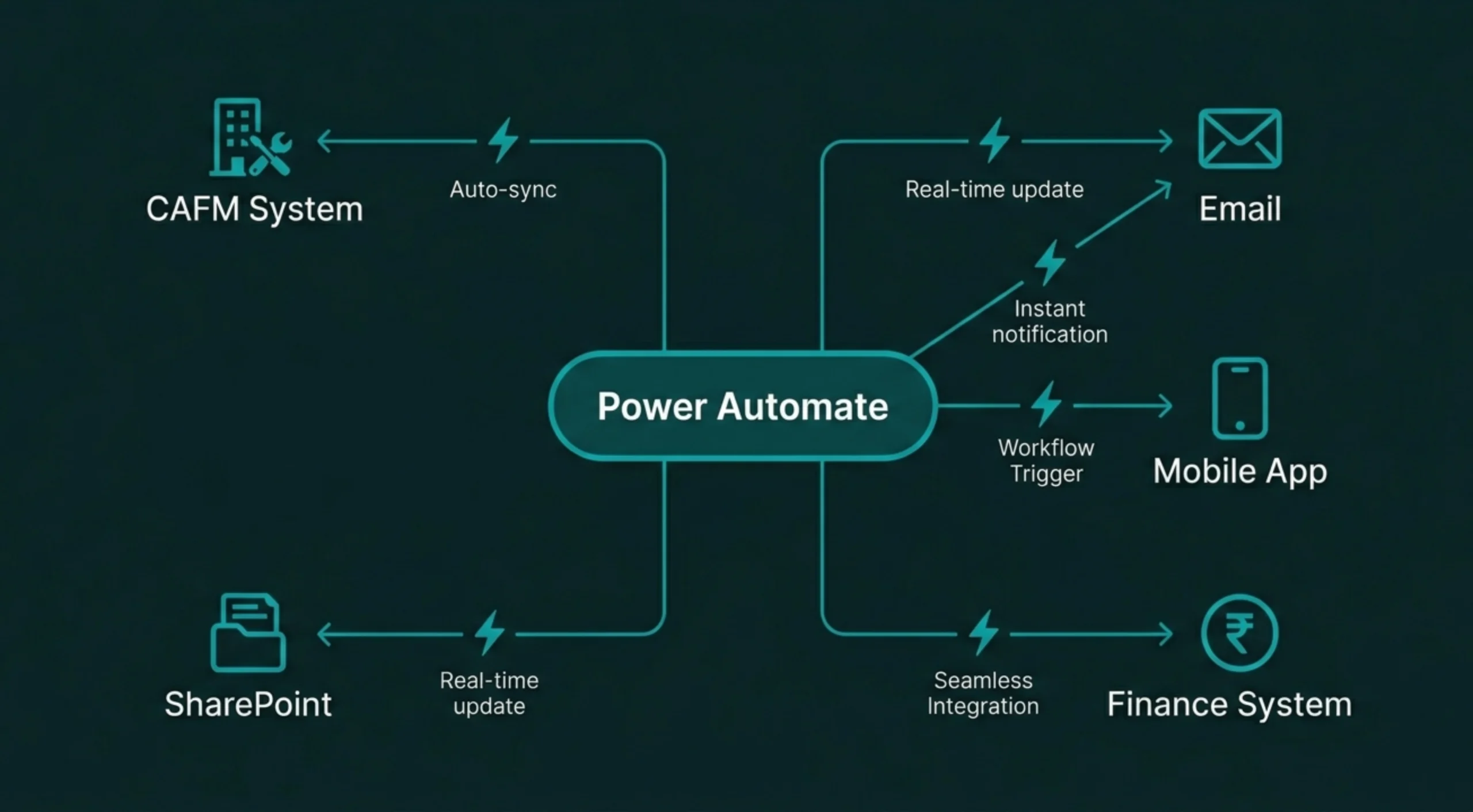
Why workflow automation eliminates the admin bottleneck
Power Automate is Microsoft's workflow automation tool within the Power Platform. It allows you to build automated processes — called flows — that connect your existing systems without writing code. When an event happens in one system, Power Automate triggers an action in another. No manual handoff. No re-entry. No delay.
The value for FM, construction and manufacturing operations is immediate: workflows that previously required five manual steps and two hours of admin time now execute in seconds, automatically, every time.
This is not theoretical. This is how national FM contractors are running operations right now. The technology is not new or experimental — Power Automate has been in production use since 2016 and is used by over 5 million businesses globally.
Five high-impact workflows every FM operation should automate
Workflow automation delivers the greatest return when applied to high-volume, rules-based processes. These are the workflows that FM, construction and manufacturing teams automate first:
Approval routing and escalation
Purchase orders, holiday requests, and RAMS approvals route automatically to the correct manager based on value, contract, or location. If not approved within 24 hours, escalate to the next level. Every decision is logged with a timestamp and approval trail for compliance audits.
Data synchronisation between systems
When a new client is added to your CRM, automatically create the corresponding records in your CAFM system, finance package, and contractor portal. When an engineer updates a job status in the mobile app, sync that data to the CAFM, notify the site contact, and update the client-facing dashboard — all in real time.
Compliance deadline monitoring
Automatically flag gas certificates, electrical testing, or fire alarm inspections that are due within 30 days. Send reminders to the responsible engineer, escalate to the contracts manager if not actioned within 7 days, and generate a compliance risk report for the operations director every Monday morning.
Document generation and distribution
Generate weekly site reports, monthly KPI summaries, or annual compliance packs automatically from data in your CAFM or Power BI dashboard. Populate Word or PDF templates with live data, save to SharePoint, and email to the client — every Friday at 4pm without manual effort.
Incident response and escalation
When a critical equipment failure is logged, automatically create a high-priority work order, notify the on-call engineer via SMS, alert the site manager, update the client portal, and start a timer for SLA tracking. If not resolved within 2 hours, escalate to the operations director and the client account manager.
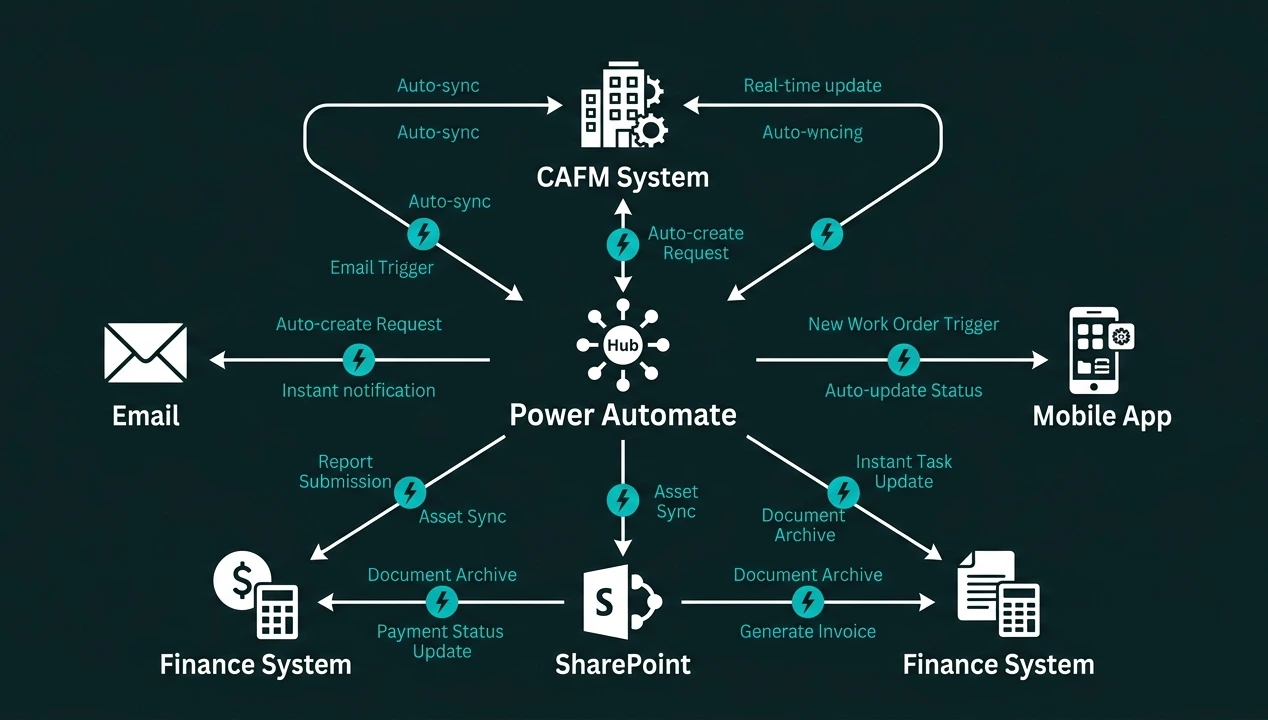
Measurable impact: what changes when you automate admin workflows
The value of workflow automation is not abstract. It shows up in three measurable areas:
Admin Time Saved
Typical reduction in time spent on approvals, data entry, and manual coordination across FM operations teams
Per Person Per Week
Average time reclaimed per operations or admin team member when high-volume workflows are automated
Error Reduction
Data accuracy improvement when manual re-entry is eliminated and systems sync automatically
Faster response times. Automated workflows execute in seconds rather than hours or days. A work order that previously took 45 minutes to manually log, assign, and communicate is now created and dispatched in under 10 seconds. SLA breaches drop. Client satisfaction improves.
Better compliance and audit trails. Every automated workflow logs exactly what happened, when it happened, and who approved it. When an auditor asks for proof that all gas safety certificates were renewed on time, you generate the report in 30 seconds rather than spending three days manually checking spreadsheets.
Scalability without headcount. The most significant long-term benefit is operational leverage. When your contract base grows by 30%, your admin overhead does not grow by 30%. Automated workflows handle increased volume without additional staff, allowing you to scale efficiently.
Why Power Automate — not Zapier, Make, or custom scripts
Workflow automation is not unique to Power Automate. Zapier, Make (formerly Integromat), and custom-built scripts can all connect systems and automate processes. So why do FM, construction, and manufacturing businesses choose Power Automate?
For businesses already using Microsoft 365, SharePoint, or Dynamics, Power Automate is the logical choice. It is already included in your licence bundle, integrates natively with the tools your team already uses, and keeps all your data within your own tenant rather than passing it through third-party servers.
How to start automating workflows in your FM operation
The barrier to entry for workflow automation is lower than most operations managers expect. You do not need a development team or a six-month project plan. Most businesses start with a single high-impact workflow and expand from there.
Identify the bottleneck
Choose one high-volume, repetitive process that currently wastes the most admin time — usually approvals or data entry.
Map the current workflow
Document every manual step, system handoff, and approval gate in the existing process. This becomes your automation blueprint.
Build and test the flow
Use Power Automate's low-code designer to build the automated version. Test with real data in a safe environment before deploying.
Deploy and measure
Switch on the flow, monitor for issues, and measure the time saved. Use the win to justify automating the next process.
Most initial flows are deployed within 2–4 weeks. The learning curve is not steep — if you can map a process in a flowchart, you can build it in Power Automate. For more complex integrations involving legacy systems or custom connectors, working with a Power Platform specialist accelerates delivery and avoids common architectural mistakes.
Stop paying people to do robot work
The cost of admin overhead is not just the wasted hours. It is the opportunity cost of having skilled people perform tasks that a machine can execute better, faster, and more consistently. Every hour your facilities coordinator spends manually entering data is an hour they are not solving operational problems or improving client service.
Workflow automation with Power Automate does not replace people. It removes the repetitive work that prevents people from doing their actual jobs. The result is a leaner, faster, more capable operation that can scale without burning out the team.
If your FM, construction, or manufacturing business is still running on email chains, manual approvals, and disconnected spreadsheets, you are paying a tax on every transaction. That tax is your team's time. It is time to stop paying it.
Ready to replace your spreadsheets?
Book a free 60-minute discovery call and we will show you what is possible for your business.
Book a Discovery Call →