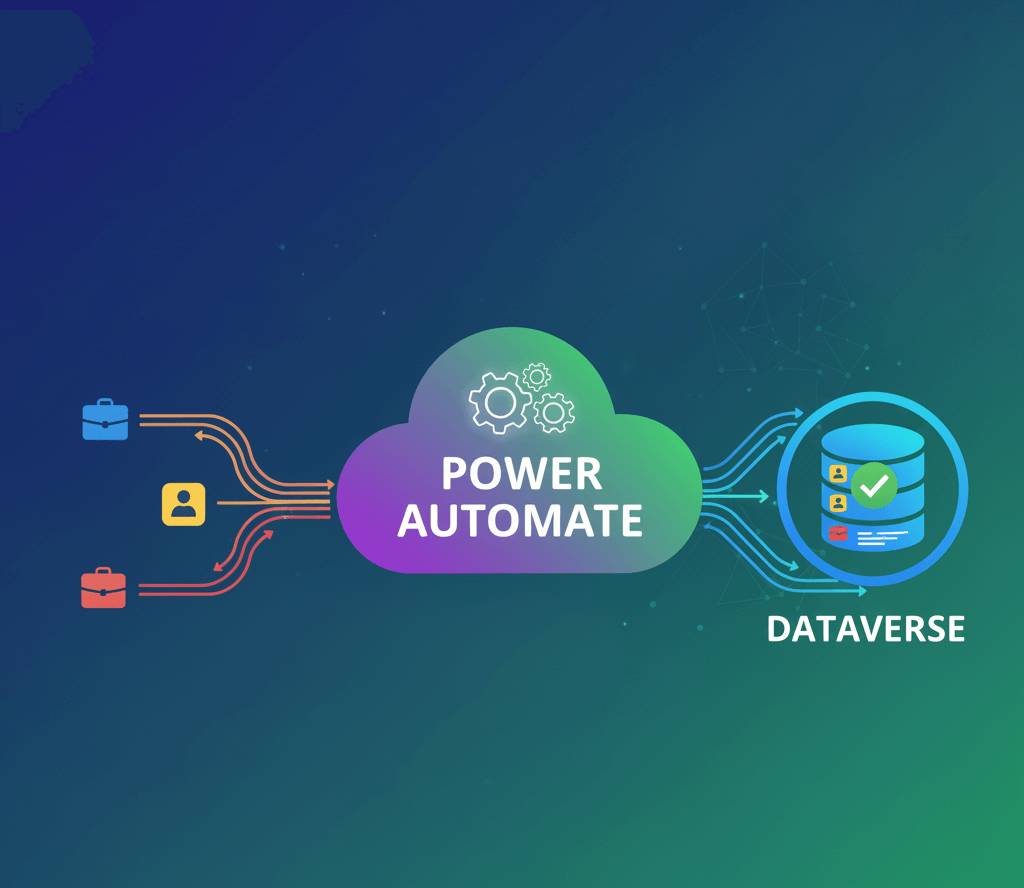
The modern Rich Text Editor (RTE) available in Microsoft Dataverse model-driven apps provides a powerful authoring experience out of the box. However, many makers do not realise that the editor is based on CKEditor and can be customised using a JSON configuration file loaded from a JavaScript web resource. With the right configuration, the RTE can support controlled HTML formatting, extended toolbar features, consistent styling across environments and a significantly richer editing experience without requiring a custom Power Apps Component Framework (PCF) control.
This capability is especially useful where teams need more structured content, reusable templates or enhanced text layouts. By configuring the editor through JSON, organisations can enable full-screen editing, fonts, colours, tables and even allow specific HTML tags and attributes. This approach remains entirely within Microsoft’s supported model and avoids the long-term maintenance overhead associated with custom components.
This article explains why you would customise the RTE, how to enable safe HTML functionality, how to upload the configuration file and how to reference it correctly using the “Static value” property. A complete, working JSON example is included that you can copy and adapt to your own Power Platform environment.
Why Customise the Dataverse Rich Text Editor?
Customising the Dataverse Rich Text Editor offers significant advantages for both user experience and content governance. Many organisations work with structured or formatted content such as knowledge articles, customer communications, instructions, proposal templates or internal documentation. The default editor supports only basic formatting, which can limit clarity and consistency across teams.
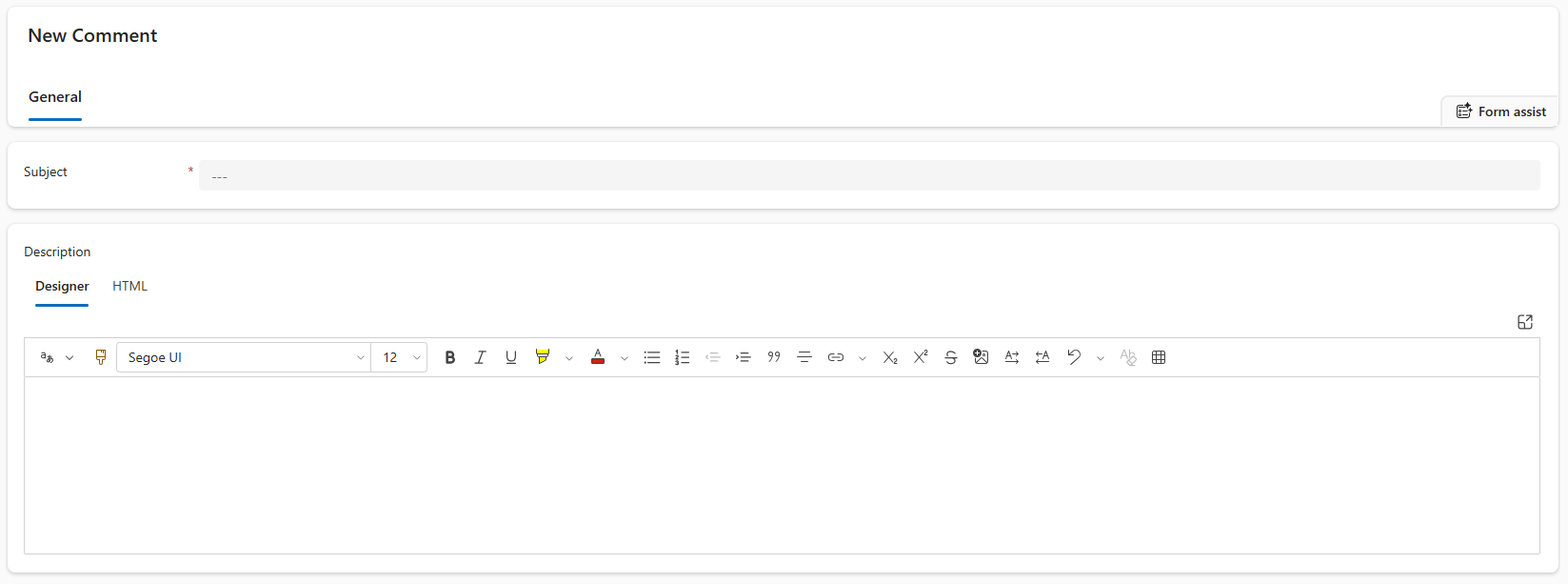
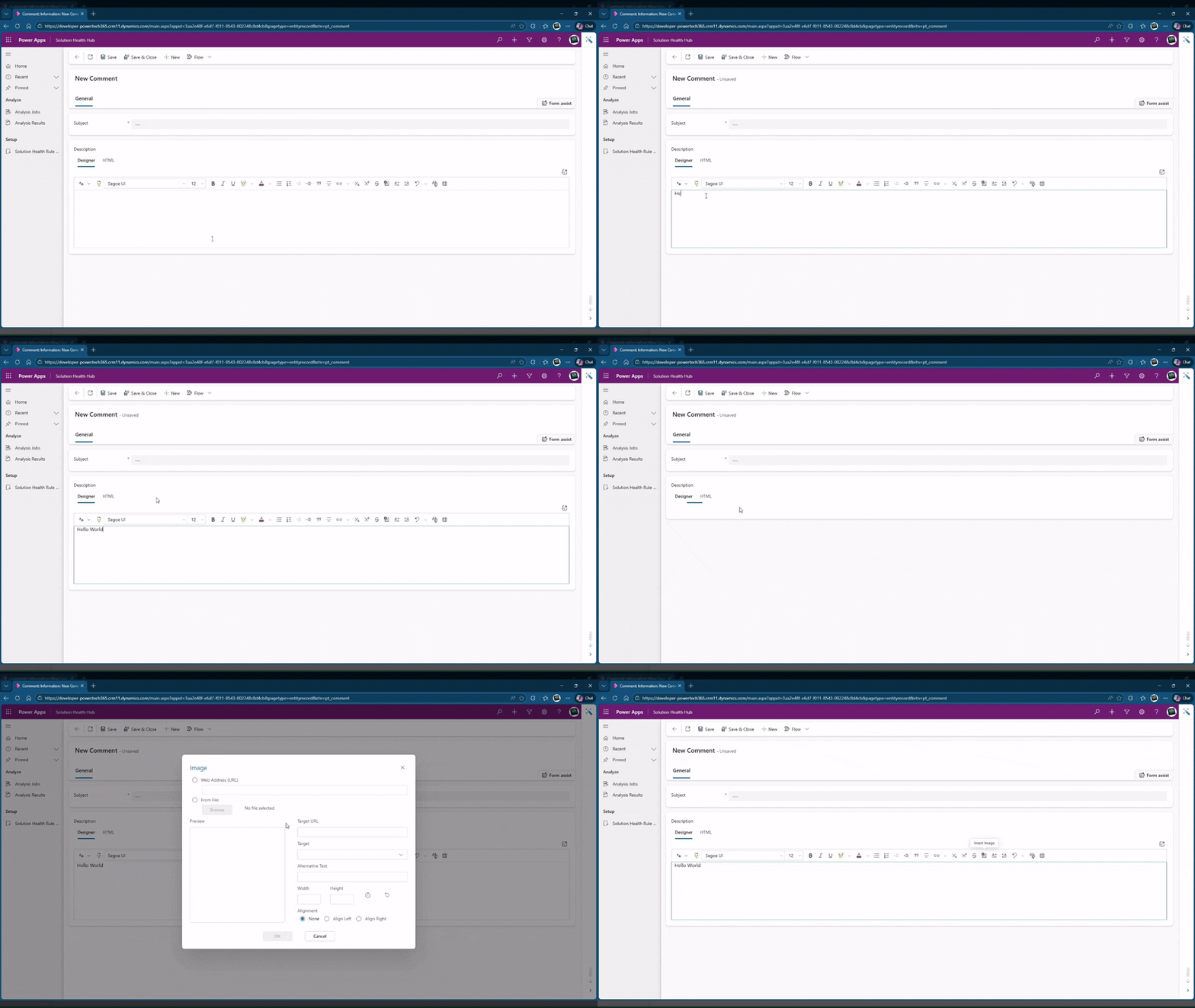
By applying a JSON configuration, you can extend the editor with a wider and more useful toolbar, including font choices, colours, bullet styles, tables, images, alignment controls and more. This gives users the tools they need to create professional, readable and maintainable content directly within a model-driven app.
Another reason to customise the editor is the ability to safely allow HTML tags and attributes. By controlling sanitisation through the configuration file, you can permit specific tags such as <div>, <span>, and inline CSS properties. This makes it possible to use approved HTML blocks, externally generated content or standardised layout snippets without them being stripped out by Dataverse sanitisation rules.
It is important to recognise the boundaries of this approach. Microsoft does not expose an HTML source or “view HTML” mode in the editor, and unsupported configuration entries will be ignored silently. For scenarios where full HTML editing or advanced interaction is required, using a custom PCF remains a valid path. For most content-heavy business processes, however, JSON configuration strikes the ideal balance between capability, supportability and simplicity.
When to Use JSON RTE Configuration Instead of a PCF
JSON configuration is the preferred approach when you want to improve the editor’s features without the cost and overhead of developing a PCF control. It allows makers to configure the toolbar, appearance, plugins and behaviour of the editor while keeping everything within Microsoft’s supported customisation boundary. This makes the configuration suitable for deployment across all environments as part of your ALM strategy.
Typical use cases include knowledge management, structured documentation, customer-facing descriptions, standardised templates and internal collaboration. These scenarios often require more flexibility than the out-of-the-box editor provides, and JSON configuration addresses these needs quickly and reliably.
A key advantage of the JSON approach is that it can safely support approved HTML. If your business processes rely on formatted text generated elsewhere, or if you need to embed structured layouts, you can open the editor to specific HTML elements while still protecting users from unsafe content. This ability often eliminates the need for a PCF altogether.
A PCF becomes appropriate when your requirements include full HTML source editing, custom rendering logic, or completely bespoke behaviours. For most organisations, however, JSON configuration offers a cost-effective and powerful alternative that remains easy to maintain.
Prerequisites & Preparation
Before applying a custom configuration, ensure that your Dataverse table contains a Multiple Lines of Text column configured as Rich Text. The editor must be added to the form through the modern form designer, and the Rich Text Editor control must be enabled for Web, Phone and Tablet. This ensures that your configuration applies consistently across all clients.
You will need to create a JSON file containing your editor configuration. Although the content is plain JSON, Dataverse requires it to be uploaded as a JavaScript web resource. After uploading, publish the resource so it becomes available to the form. You will reference this file by its relative path beginning with /WebResources/.
Browser caching can interfere with testing. Once you have referenced the configuration file and published the form, refresh the model-driven app using a private browser session or a hard refresh to ensure your changes are applied.
Applying a Custom JSON Configuration
Start by preparing the field on your form. Open the form designer and add or select your Multiple Lines of Text column. Ensure its format is set to Rich text. Under the Components section, add the Rich Text Editor control and enable it across supported clients.

Create your JSON configuration file, which defines the toolbar, plugins, sanitisation rules and behaviour of the editor. Save it as a text file and upload it as a JavaScript web resource. Although no JavaScript code is present, Dataverse expects this resource type when loading editor configurations. Publish the resource once uploaded.
Open the control properties on your form and locate the Static value field. Enter the relative path to your web resource, for example:
/WebResources/pt_CustomRichTextEditor
You can find the relative URL via web resources, just remove the environment URL.
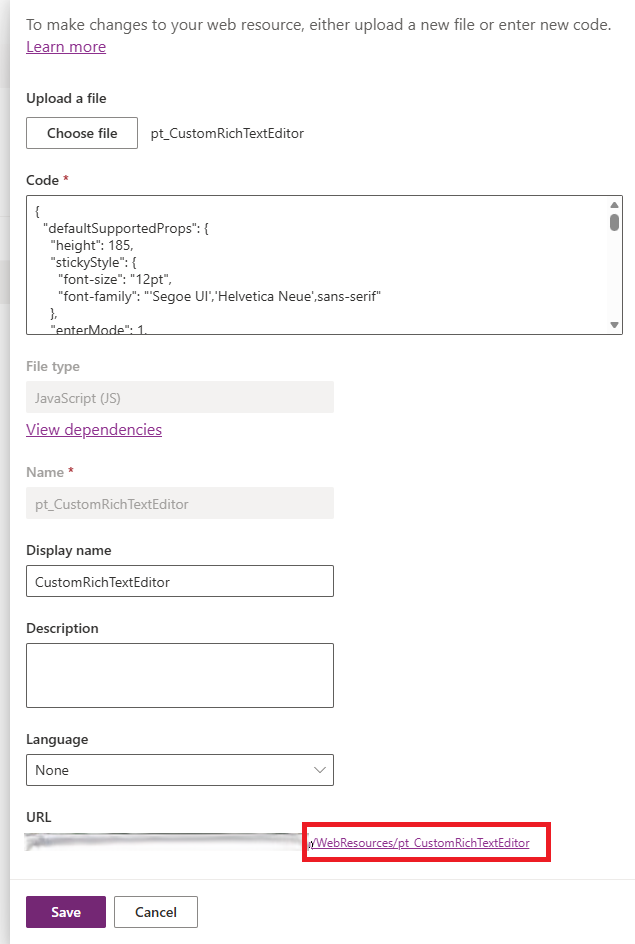
Publish the form and reload the app. If the editor looks unchanged, verify that the path is correct and check that caching is not interfering. Testing in an InPrivate browser window usually resolves this.
If your goal is to enable safe HTML support, pay attention to the sanitiser settings. The configuration includes a sanitizerAllowlist section where you can permit specific tags, attributes or CSS properties. For more permissive scenarios, you can disable sanitisation entirely, though this should be limited to secure environments where content sources are trusted.
Working JSON Configuration for the Dataverse Rich Text Editor
The following JSON configuration provides an extended toolbar, full-screen capability and optional HTML support using sanitiser allowlists. It also demonstrates the correct use of the editorplaceholder property, which replaces older unsupported options.
  {
  "defaultSupportedProps": {
    "height": 185,
    "stickyStyle": {
      "font-size": "12pt",
      "font-family": "'Segoe UI','Helvetica Neue',sans-serif"
    },
    "enterMode": 1,
    "stickyStyles_defaultTag": "div",
    "font_defaultLabel": "Segoe UI",
    "fontSize_defaultLabel": "12",
    "toolbarLocation": "top",
    "toolbar": [
      ["CopilotRefinement"],
      ["CopyFormatting"],
      ["Font"],
      ["FontSize"],
      ["Bold"],
      ["Italic"],
      ["Underline"],
      ["BGColor"],
      ["TextColor"],
      ["BulletedList"],
      ["NumberedList"],
      ["Outdent"],
      ["Indent"],
      ["Blockquote"],
      ["JustifyLeft"],
      ["JustifyCenter"],
      ["JustifyRight"],
      ["Link"],
      ["Unlink"],
      ["Subscript"],
      ["Superscript"],
      ["Strike"],
      ["Image"],
      ["BidiLtr"],
      ["BidiRtl"],
      ["Undo"],
      ["Redo"],
      ["RemoveFormat"],
      ["Table"]
    ],
    "extraPlugins": "copilotrefinement,accessibilityhelp,autogrow,autolink,basicstyles,bidi,blockquote,button,collapser,colorbutton,colordialog,confighelper,contextmenu,copyformatting,dialog,editorplaceholder,filebrowser,filetools,find,floatpanel,font,iframerestrictor,indentblock,justify,notification,panel,panelbutton,pastefromword,quicktable,selectall,stickystyles,superimage,tableresize,tableselection,tabletools,uploadfile,uploadimage,uploadwidget",
    "toolbarcollapser_enableResizer": false,
    "editorplaceholder": "",
    "linkTargets": ["notSet", "_blank"],
    "stylesSet": "default",
    "fontSize_sizes": "8/8px;9/9px;10/10px;11/11px;12/12px;14/14px;16/16px;18/18px;20/20px;22/22px;24/24px;26/26px;28/28px;36/36px;48/48px;72/72px",
    "font_names": "Angsana New/'Angsana New', 'Leelawadee UI', Sathu, serif;Arial/Arial, Helvetica, sans-serif;Arial Black/'Arial Black', Arial, sans-serif;Calibri Light/'Calibri Light', 'Helvetica Light', sans-serif;Calibri/Calibri, Helvetica, sans-serif;Cambria/Cambria, Georgia, serif;Candara/Candara, Optima, sans-serif;Century Gothic/'Century Gothic', sans-serif;Comic Sans MS/'Comic Sans MS';Consolas/Consolas, Courier, monospace;Constantia/Constantia, 'Hoefler Text', serif;Corbel/Corbel, Skia, sans-serif;Cordia New/'Cordia New', 'Leelawadee UI', Silom, sans-serif;Courier New/'Courier New';DaunPenh/DaunPenh, 'Leelawadee UI', 'Khmer MN', sans-serif;Franklin Gothic Book/'Franklin Gothic Book', 'Avenir Next Condensed', sans-serif;Franklin Gothic Demi/'Franklin Gothic Demi', 'Avenir Next Condensed Demi Bold', sans-serif;Franklin Gothic Medium/'Franklin Gothic Medium', 'Avenir Next Condensed Medium', sans-serif;Garamond/Garamond, Georgia, serif;Gautami/Gautami, 'Nirmala UI', 'Telugu MN', sans-serif;Georgia/Georgia, serif;Impact/Impact, Charcoal, sans-serif;Iskoola Pota/'Iskoola Pota', 'Nirmala UI', 'Sinhala MN', sans-serif;Kalinga/Kalinga, 'Nirmala UI', 'Oriya MN', sans-serif;Kartika/Kartika, 'Nirmala UI', 'Malayalam MN', sans-serif;Latha/Latha, 'Nirmala UI', 'Tamil MN', sans-serif;Leelawadee UI/'Leelawadee UI', Thonburi, sans-serif;Lucida Console/'Lucida Console', Monaco, monospace;Lucida Handwriting/'Lucida Handwriting', 'Apple Chancery', cursive;Lucida Sans Unicode/'Lucida Sans Unicode';Mangal/Mangal, 'Nirmala UI', 'Devanagari Sangam MN', sans-serif;Nirmala UI/'Nirmala UI', sans-serif;Nyala/Nyala, Kefa, sans-serif;Palatino Linotype/'Palatino Linotype', 'Book Antiqua', Palatino, serif;Raavi/Raavi, 'Nirmala UI', 'Gurmukhi MN', sans-serif;Segoe UI/'Segoe UI', 'Helvetica Neue', sans-serif;Shruti/Shruti, 'Nirmala UI', 'Gujarati Sangam MN', sans-serif;Sitka Heading/'Sitka Heading', Cochin, serif;Sitka Text/'Sitka Text', Cochin, serif;Sylfaen/Sylfaen, Mshtakan, Menlo, serif;TW Cen MT/'TW Cen MT', 'Century Gothic', sans-serif;Tahoma/Tahoma, Geneva, sans-serif;Times New Roman/'Times New Roman', Times, serif;Times/Times, 'Times New Roman', serif;Trebuchet MS/'Trebuchet MS';Tunga/Tunga, 'Nirmala UI', 'Kannada MN', sans-serif;Verdana/Verdana, Geneva, sans-serif;Vrinda/Vrinda, 'Nirmala UI', 'Bangla MN', sans-serif;メイリオ/Meiryo, メイリオ, 'Hiragino Sans', sans-serif;仿宋/FangSong, 仿宋, STFangsong, serif;微軟正黑體/'Microsoft JhengHei', 微軟正黑體, 'Apple LiGothic', sans-serif;微软雅黑/'Microsoft YaHei', 微软雅黑, STHeiti, sans-serif;新宋体/NSimSun, 新宋体, SimSun, 宋体, SimSun-ExtB, 宋体-ExtB, STSong, serif;新細明體/PMingLiU, 新細明體, PMingLiU-ExtB, 新細明體-ExtB, 'Apple LiSung', serif;楷体/KaiTi, 楷体, STKaiti, serif;標楷體/DFKai-SB, 標楷體, BiauKai, serif;游ゴシック/'Yu Gothic', 游ゴシック, YuGothic, sans-serif;游明朝/'Yu Mincho', 游明朝, YuMincho, serif;隶书/SimLi, 隶书, 'Baoli SC', serif;黑体/SimHei, 黑体, STHeiti, sans-serif;굴림/Gulim, 굴림, 'Nanum Gothic', sans-serif;궁서/Gungsuh, 궁서, GungSeo, serif;돋움/Dotum, 돋움, AppleGothic, sans-serif;맑은 고딕/'Malgun Gothic', '맑은 고딕', AppleGothic, sans-serif;바탕/Batang, 바탕, AppleMyungjo, serif;바탕체/BatangChe, 바탕체, AppleMyungjo, serif;MS Pゴシック/'MS PGothic', 'MS Pゴシック', 'MS Gothic','MS ゴシック', 'Hiragino Kaku Gothic ProN', sans-serif;MS P明朝/'MS PMincho', 'MS P明朝', 'MS Mincho', 'MS 明朝', 'Hiragino Mincho ProN', serif",
    "copyFormatting_allowRules": "b s u i em strong span p div td th ol ul li(*)[*]{*}"
  },
  "readOnlySettings": {
    "height": 500,
    "showFullScreenExpander": true
  },
  "sanitizerAllowlist": {
    "attributes": [],
    "cssProperties": [],
    "domains": [],
    "protocols": [],
    "tags": []
  },
  "disableContentSanitization": true,
  "disableOnLoadEditModeSanitization": true,
  "disableDefaultImageProcessing": true,
  "showFullScreenExpander": true,
  "showAsTabControl": true,
  "showHtml": true
}
To add Copilot refinement support, include copilotrefinement in extraPlugins and add ["CopilotRefinement"] to the toolbar. Licensing and environment settings apply.
Troubleshooting
- Editor appears unchanged: Check the Static value path, publish both the web resource and form, and refresh using a private browsing window to avoid cached content.
- HTML removed or stripped: Update the
sanitizerAllowlistsection and ensure sanitisation settings permit the required tags and attributes. - Missing toolbar items: Unsupported CKEditor items are ignored silently; verify that each toolbar entry exists in the modern RTE.
- Layout or height issues: Adjust the
heightvalue or rely on the built-in full-screen expander for complex content. - Errors loading configuration: Ensure the JSON is valid with no comments or trailing commas, as invalid structures cause fallback to defaults.
Conclusion
Customising the Dataverse Rich Text Editor with a JSON configuration allows organisations to greatly enhance content creation within model-driven apps. This approach offers richer formatting, a more intuitive writing environment, consistent branding and the ability to embed controlled HTML where appropriate. Because the configuration is lightweight, supported and solution-aware, it fits naturally into enterprise ALM and governance processes.
Safe HTML support makes this method even more powerful, enabling teams to embed structured layouts, templates and externally generated HTML while still protecting user security. For scenarios requiring full HTML editing, a custom PCF may still be necessary, but in most cases JSON configuration provides the perfect balance between capability and maintainability.
PowerTech365 supports organisations across the Power Platform with solution design, governance, RTE standardisation and custom component development. Get in touch if you would like help implementing a standard Rich Text Editor configuration or enhancing your Dataverse applications.